SMS Information
This is the high-level reference for SMS on FlyNumber — what to expect from FlyNumbers, why international delivery can be variable, how 2FA/verification messages behave, and what the personal-use rule means for outbound SMS.
FlyNumber currently supports incoming SMS on select numbers, with per-segment billing in some countries and no charge in others. Outbound SMS works by default on any FlyNumber whose coverage includes the SMS out capability — no activation request needed — and is meant for personal, person-to-person (P2P) messaging only. Texting to US numbers is the one route that isn't open yet; it's coming soon. See Outbound SMS for how it works and what's allowed.
If you're looking for how to use the messaging UI day-to-day, that's SMS in Core Settings. If you're looking for what it costs, that's SMS Billing.
| Looking for… | Go to |
|---|---|
| Send and receive in the panel, conversation threads, error toasts | Core Settings → SMS |
| Per-segment pricing, charged-inbound countries, daily caps | Payments and Billing → SMS Billing |
| Which numbers and countries support SMS in/out | Coverage |
| Current per-country rates | Rates → SMS |
Checking SMS availability
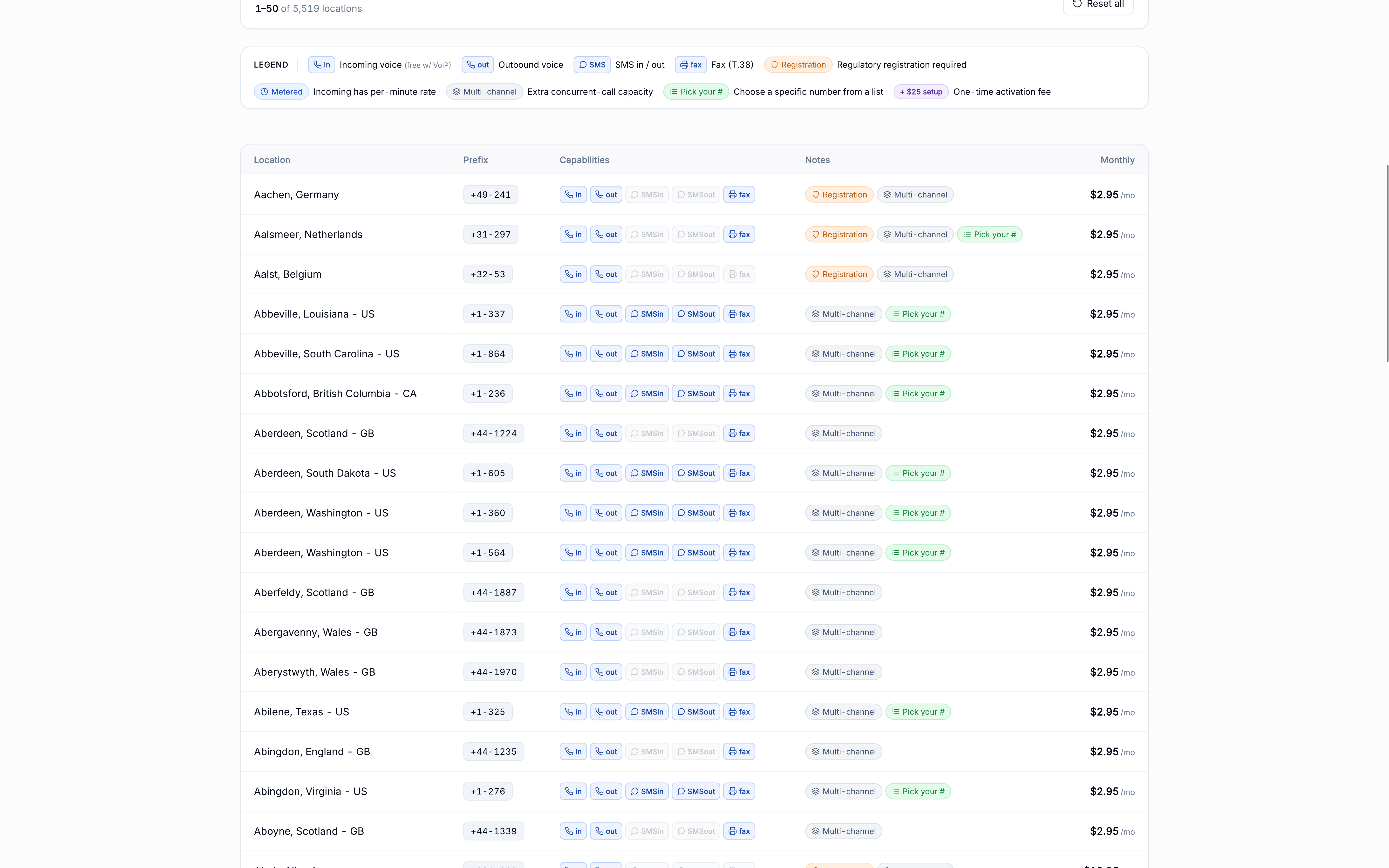
The Coverage page is the source of truth for which FlyNumbers support SMS. Toggle the SMS in and SMS out filter pills above the table to narrow the list to numbers that match what you need — each row shows the capability badges, registration requirements, multi-channel notes, and the monthly price.
For actual rates per country and sender type (regular numbers vs short codes), see /rates#sms.
SMS is off by default on Lithuania mobile FlyNumbers, no matter how the number is set up in the panel — the number won't receive any texts until activation is requested through a support ticket. Activation carries a one-time setup fee plus a monthly fee on top of the number's monthly rate — see Lithuania mobile — activation required for the amounts.
How inbound SMS reaches you
Every inbound SMS arrives two ways at once:
- In the panel at panel.flynumber.com/sms — a chat-style inbox with real-time updates and a notification bell in the header
- Via email — to your account email by default, or to a single custom address you set on the Incoming SMS card at Notification Settings
The custom email override is account-wide — it applies to inbound SMS on all your FlyNumbers. There's no per-number forwarding email in the panel today. Full walkthrough at Core Settings → SMS → Email forwarding.
If an inbound message doesn't arrive, check your spam/junk folder and whitelist @mail.flynumber.com. If it's still missing, the message may have been filtered by an upstream carrier (see International SMS reliability).
International SMS reliability
SMS works most reliably when the sender and your FlyNumber are located in the same country. International SMS messages (from a different country to your FlyNumber) may not always arrive — this is an industry-wide pattern for online phone numbers, not a FlyNumber-specific limitation.
Same-country vs international
| Sender's country | Your FlyNumber's country | Reliability | Why |
|---|---|---|---|
| USA | USA | High | Single domestic network, established carrier agreements |
| UK | Germany | Variable / low | Message passes through multiple international carriers, each with its own filtering rules for online phone numbers |
Why this happens
A few realities of how SMS infrastructure was built:
- Carrier routing agreements — international SMS hops through multiple carriers, and not every carrier has an agreement to deliver messages to online phone numbers in other countries
- Provider-side filtering — many carriers identify and filter messages to VoIP and online phone numbers as a spam-prevention measure, prioritizing traditional mobile networks
- Network architecture — SMS was originally designed for domestic mobile-to-mobile messaging; cross-border routing adds complexity and potential failure points
Recommendations for reliable inbound
- Match the country — if you need reliable SMS from contacts in a specific country, use a FlyNumber from that same country. The Coverage page makes this easy to filter for.
- Prefer voice verification — for 2FA codes, "verify by phone call" is consistently more reliable than SMS on FlyNumbers
- OTT apps for international chats — WhatsApp, Signal, and Telegram bypass the SMS network entirely and are excellent for cross-border conversation
2FA and verification services
Whether a service's 2FA code reaches your FlyNumber depends on the sender — their carrier, whether they filter online phone numbers, and how they route internationally. We've seen success with many services and failures with others. Where possible, prefer "Verify by Phone Call" over SMS.
What to expect
| Message Type (received on your number) | Compatibility |
|---|---|
| Regular mobile-to-mobile SMS | Generally works well |
| Short code messages | Varies by provider |
| 2FA verification codes | Depends on sending service |
| Incoming marketing messages (received on your number) | Usually delivered successfully |
| WhatsApp registration code (received) | One-time verification SMS received during signup; all later messaging happens inside the WhatsApp app, not over SMS |
SMS activation on Lithuania mobile doesn't change this table — activation enables person-to-person texts, and whether a verification code arrives still depends on the sending service.
FlyNumber users have successfully registered their numbers with WhatsApp Business accounts through Meta Business Suite, enabling integration with various Meta platforms including Facebook and Instagram. WhatsApp is a separate, app-based messaging service: registration only uses your FlyNumber to receive a one-time verification, and any messaging then happens inside WhatsApp — not over SMS. This is WhatsApp's own product, not SMS on your FlyNumber. Registering with WhatsApp Business does not change what SMS on your FlyNumber can do: outbound SMS remains a person-to-person (P2P) service for personal messaging.
Keep in mind that WhatsApp Business registration processes and requirements may vary by region and account type.
Most services that offer SMS 2FA also offer a "Verify by Phone Call" option:
- The service calls your FlyNumber
- You answer and hear the verification code read aloud
- Enter the code on the service's website or app
Phone verification works on every FlyNumber that's set up to receive calls — it doesn't depend on SMS routing at all, which is why it's so much more reliable on FlyNumbers.
Best practices
For services where verification matters:
- Test before relying on it — send yourself a code or trigger a test verification before you depend on the service
- Have a backup method ready — most services let you register a recovery email or app-based 2FA (Google Authenticator, Authy) alongside SMS
- Ask the service about FlyNumber compatibility if you're unsure
- Choose phone-call verification when offered
Outbound SMS
Outbound SMS works by default — there's no activation request, account review, or approval step. Any FlyNumber that carries the SMS out badge on the coverage page can send, and messages go out from the chat interface at panel.flynumber.com/sms. If a number doesn't carry the badge, outbound isn't available for it at the carrier level. For the day-to-day walkthrough, see Core Settings → SMS.
Outbound SMS is for personal, person-to-person (P2P) messaging — the way you'd text from your everyday mobile. It is not built for marketing, bulk, or automated traffic; see what's allowed below.
What counts as personal P2P use
Person-to-person means one individual texting another in a conversational, one-on-one way — sending a message from your FlyNumber to a friend, family member, or other personal contact.
Permitted (personal, one-on-one messaging):
- Replying to a text from a personal contact
- Coordinating plans, sharing details, or staying in touch with people you know
- Casual one-on-one conversations
Not permitted (application-to-person / A2P traffic):
- Marketing, promotional, or sales messages
- Bulk, broadcast, or mass-list messaging
- Automated alerts, app-generated notifications, or scheduled sends
- Two-factor authentication (2FA) or verification codes sent to your own users
- Lead generation, surveys, polls, or appointment reminders
- Any application-to-person (A2P) traffic
A2P messaging of that kind requires a registered A2P campaign (for example, 10DLC in the US) through a provider that specializes in A2P traffic — FlyNumber doesn't carry it today, though texting US numbers will run as A2P when it arrives.
Texting US numbers — coming soon
Sending a text to a US number isn't possible yet from any FlyNumber — that includes US-to-US. The route is coming soon and will run as A2P (application-to-person) rather than P2P, since that's the registered path US carriers require. Today an attempt either stops in the panel with "We can't text this destination from this number right now." or fails after sending with a Destination not supported note on the bubble.
US FlyNumbers can already send abroad. A US number carrying the SMS out badge can text destinations outside the US, person-to-person, right now. One caveat: whether the message lands is up to the receiving network — carriers in some countries accept texts from US numbers while others filter or discard them, so delivery abroad can vary by country and even by carrier.
Usage limits
A few rate limits run on every account to protect against runaway sends:
- 5 sends per minute
- 30 sends per hour
- $50 in outbound spend per day
Limits roll forward on rolling windows as old sends age out. For per-segment math and pricing details, see SMS Billing → How segment math works.
Monitoring
Outbound traffic is monitored. Accounts trending toward bulk or automated (A2P-style) sending patterns may have outbound disabled to protect carrier relationships. If your outbound has been disabled and you'd like to discuss your use case, open a support ticket and our team will review.
Where to next
- Day-to-day SMS usage — Core Settings → SMS
- SMS pricing and segment math — Payments and Billing → SMS Billing
- Per-message charge log — SMS Charges in the panel
- Which numbers support SMS — Coverage
- Current SMS rates — /rates#sms
- Set a custom inbound email — Notification Settings