SMS Billing
Inbound SMS to a FlyNumber is free in most countries and per-segment in a handful. Outbound SMS is per-segment for every supported destination. This page covers how segments are counted, where to see what you've spent, and what happens when your balance runs low.
For configuring where messages get sent, see SMS Information.
Check coverage and rates first
Two pages on the main site tell you what's possible and what it costs before you commit to a number:
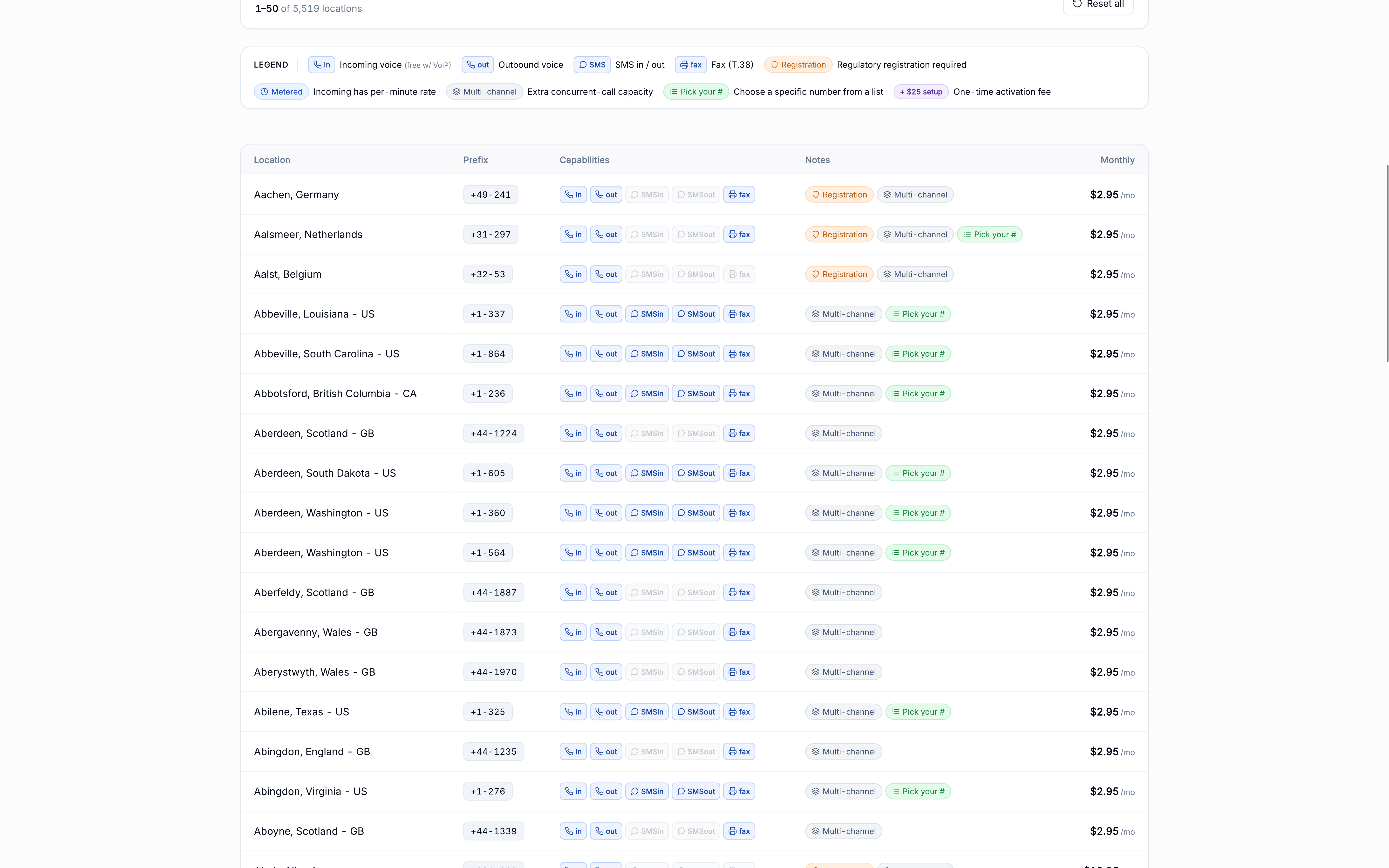
- Coverage — toggle the SMS in and SMS out capability pills to filter the list to numbers that support messaging in the direction you need. Each row shows the badges so you can confirm at a glance.
- Rates → SMS — the always-current per-segment cost for every supported country and sender type. This is the source of truth for everything below.
What gets charged
| Direction | When charged |
|---|---|
| Inbound | Only for FlyNumbers in a handful of countries (United States, Mexico, Lithuania, Thailand at time of writing). Every other SMS-enabled country is free inbound. (Lithuania mobile also needs a one-time activation — see below.) |
| Outbound | Per-segment for every supported destination, regardless of your FlyNumber's country. |
Inbound rates also depend on sender type — regular phone numbers (8–13 digits) are typically the lower rate; short codes (4–6 digits, e.g. 87512) are typically higher.
Canadian FlyNumbers don't charge inbound at all — the SMS-in capability isn't wired on those numbers.
For the canonical current values per country and sender type, see /rates#sms.
How segment math works
Long messages get split into segments at SMS-protocol limits. Each segment is billed separately. Limits depend on encoding:
| Encoding | Single segment | Multi-segment |
|---|---|---|
| GSM-7 (Latin letters, digits, basic punctuation) | 160 characters | 153 characters per segment |
| UCS-2 (emoji, non-Latin scripts, special symbols) | 70 characters | 67 characters per segment |
The encoding flips to UCS-2 if even a single character requires it. Multi-segment messages lose 7 characters (GSM-7) or 3 characters (UCS-2) per segment to a concatenation header.
A handful of characters look basic but cost 2 GSM-7 characters via an escape sequence:
[ ] { } \ ^ ~ | and the Euro sign €
A message with several brackets or currency symbols hits the segment limit faster than expected.
Examples
Short standard message
Message: "Landed safely, see you at the gate"
- Encoding: GSM-7 (all standard characters)
- Character count: 34
- Segments: 1
Longer standard message
Message: A 200-character catch-up message to a friend
- Encoding: GSM-7
- Calculation: 200 ÷ 153 = 1.31 → rounds up
- Segments: 2
Message with emoji
Message: "See you at dinner! 🎉"
- Encoding: UCS-2 (emoji forces Unicode)
- Single-segment limit: 70 characters
- Character count: 20
- Segments: 1
Longer Unicode message
Message: An 80-character message in Chinese
- Encoding: UCS-2 (non-Latin script)
- Calculation: 80 ÷ 67 = 1.19 → rounds up
- Segments: 2
Lithuania mobile — activation required
Inbound SMS is off by default on every Lithuania mobile FlyNumber. There's nothing to configure on your side — the number simply won't receive texts until SMS is activated for it at the carrier level. (Lithuania local numbers can't receive SMS at all — activation is only for mobile numbers.)
To request it, open a support ticket with the FlyNumber you want SMS enabled on. Activation usually takes about one business day, and we confirm in the ticket once it's live.
Once active, the number receives person-to-person texts sent from regular phones. Activation adds these charges, all taken from your prepaid balance:
| Charge | Amount |
|---|---|
| Setup fee | $5.00, one-time |
| Monthly SMS fee | $4.00/month, on top of the number's monthly rate |
| Received messages | Lithuania's per-segment inbound rate — see /rates#sms |
The setup and monthly fees are upstream carrier fees specific to Lithuania mobile.
Activation enables regular person-to-person SMS. Whether a 2FA / verification code arrives still depends on the sending service — same as on any FlyNumber. See 2FA and verification services.
What happens when your balance runs low
The behavior differs by direction:
- Inbound — message delivered free. If your prepaid balance can't cover the segment charge, we still forward the message to your email and skip the fee. Don't rely on this long-term; top up so the next message bills correctly.
- Outbound — blocked. Sending fails with an "insufficient balance" error. Add funds and retry.
Set up auto-refill to keep your balance topped up automatically — and configure a low-balance notification so you know before you hit zero.
Where to see SMS charges
SMS charges have their own page: SMS Charges in the sidebar under Billing.
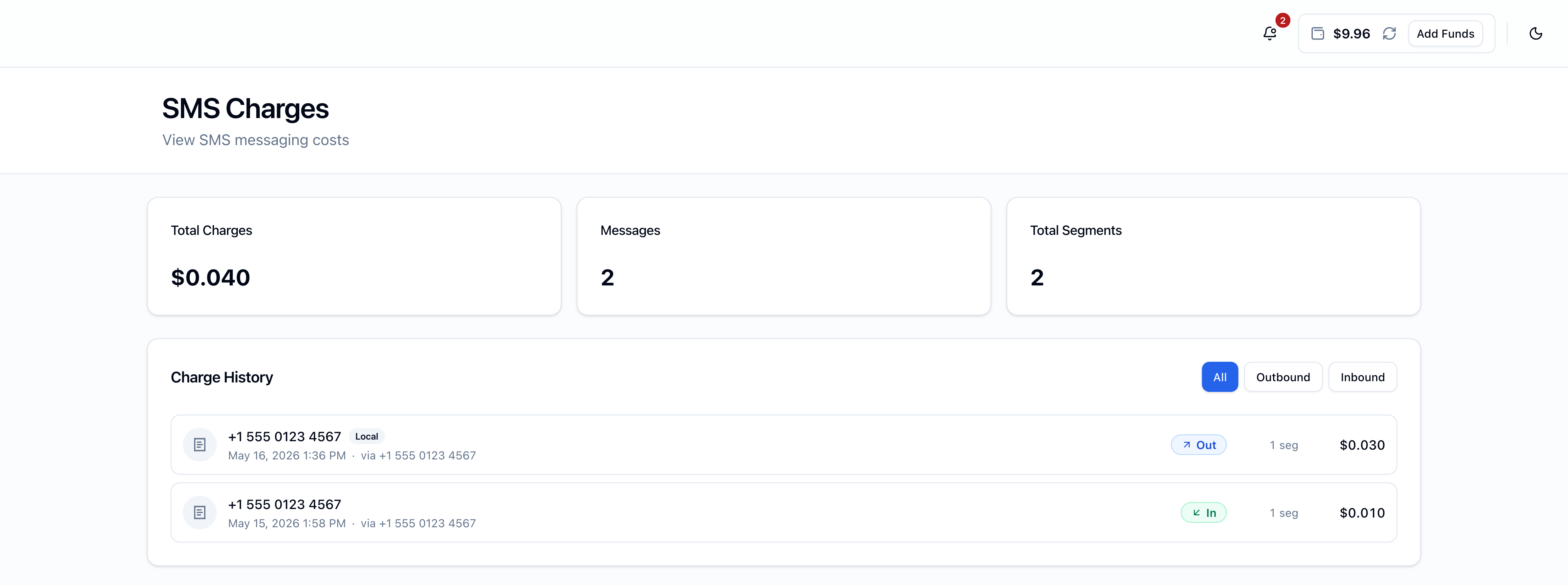
The page has:
- Three summary cards — Total Charges, Messages, Total Segments across the filtered range
- Filter pills — All / Outbound / Inbound
- Per-message rows — contact number (with a Local badge when they're in the same country as the FlyNumber), date and time, the FlyNumber used, direction badge, segment count, and the cents charged
Amounts show three decimals (e.g. $0.007) because rates can be fractional cents.
SMS charges don't appear on the Transactions page or on invoice PDFs — they have their own log on the SMS Charges page only.
Outbound SMS
Outbound SMS works by default on any FlyNumber whose coverage includes the SMS out capability — no activation request, no account review, no approval step. Sends bill per-segment for every supported destination (see segment math above); charges land on the SMS Charges log alongside inbound.
Outbound runs person-to-person (P2P) and is meant for personal, conversational messaging only — see Personal use only below for what that covers.
Outbound SMS to United States destinations isn't available yet. When it arrives it will run as A2P (application-to-person) rather than P2P. Until then, a send to an unsupported destination fails with "We can't text this destination from this number right now." and a Destination not supported note on the failed bubble.
Usage limits
A few rate limits apply to protect against runaway sends:
- 5 sends per minute per account
- 30 sends per hour per account
- $50 per day per account
Hitting a limit returns a clear error in the SMS composer; the limit window rolls forward as old sends age out.
Personal use only
Outbound is for personal, person-to-person (P2P) conversations — one-on-one messages you type and send the way you would from a mobile. The rule is about how outbound is used, not who you are.
Not permitted:
- Marketing, promotional, or sales messages
- Bulk / broadcast / mass-list sends
- Automated alerts, app-generated notifications, scheduled sends
- 2FA / verification codes sent to your own users
- Lead generation, surveys, polls, appointment reminders
- Any application-to-person (A2P) traffic
A2P traffic requires a registered campaign (10DLC in the US, similar elsewhere) through a provider that specializes in A2P messaging — FlyNumber doesn't carry A2P traffic today; US outbound will be the first exception when it launches.
Outbound traffic is monitored. Accounts trending toward bulk or automated patterns can have outbound disabled; if that happens, open a support ticket to discuss. For the full policy, see Outbound SMS.
Where to next
- Current rates per country — /rates#sms
- Browse SMS-enabled numbers — coverage
- Configure SMS forwarding — SMS Information
- Top up your balance — Add Funds
- Auto-refill setup — Payment Preferences