Phone System Billing
The cloud phone system is a flat $14.95 per month, account-wide — adding more FlyNumbers to it doesn't change the price. This page covers the pricing model, billing periods, how renewals work, the standalone add flow (for when you already have FlyNumbers and want to add the phone system on top), and the per-PS auto-renew toggle.
For configuring the phone system itself (call flows, IVR menus, SIP accounts, users), see Set to Phone System and the Phone System Guide.
Pricing model
| Item | Cost |
|---|---|
| Phone system (account-wide) | $14.95/month — flat, regardless of how many FlyNumbers you connect |
| Connected FlyNumbers | Standard per-number cost — unchanged by phone-system routing |
| Outbound calls and call-flow forwarding to phones | Per-minute, deducted from prepaid balance — see per-minute rates |
| Toll-free / "Metered" inbound | Per-minute incoming rate, deducted from prepaid balance — see toll-free incoming rates |
No setup fee, no per-channel pricing, no per-user pricing.
Billing periods
Pick a period when adding the phone system. Longer terms discount the monthly rate:
| Period | Discount |
|---|---|
| Monthly | — |
| Quarterly | 10% off |
| Semi-Annual | 15% off |
| Annual | 25% off |
Switching billing periods from inside the panel isn't surfaced for the phone system yet — to switch, click Contact in the sidebar and we'll handle it. (A dedicated UI is on the roadmap.)
How renewals work
Phone-system renewals run through the same renewal-charging pipeline as FlyNumber renewals. When the period ends:
- If per-PS Auto-Renew is on and account-wide Charge saved card on renewal is on, we walk your saved payment methods in priority order
- First successful charge extends the phone system for another period
- If every saved method fails, we fall back to prepaid balance
- If every payment path fails, the phone system enters a grace period — 5 days, or longer if it's still paid up
Auto-Renew toggle (per-PS)
Auto-Renew is a per-service switch and lives on the Billing card on the Phone System page — separate from each FlyNumber's auto-renew toggle.
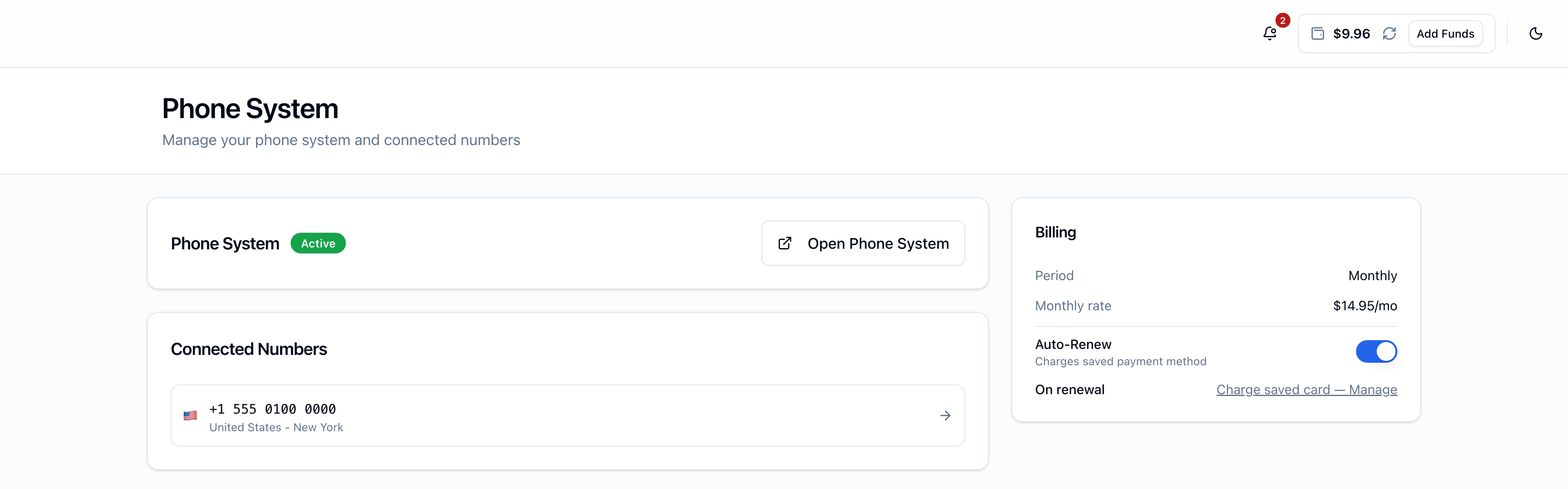
Default is on — every new phone-system order opts in. Toggling it off doesn't cancel the current period; the phone system runs to its expiry date, then enters grace instead of renewing.
Bundled with a FlyNumber order
If you bought the phone system together with a FlyNumber in the same checkout, they share a single renewal date. Each one keeps its own Auto-Renew flag though — turning off the phone-system renewal doesn't stop the FlyNumber from renewing on the same date.
Adding the phone system standalone
If you already have one or more FlyNumbers and want to add the phone system on top, open the Phone System page. With no active phone system, the page shows an Add Phone System form.
The full how-to (and how to configure the phone system once it's active) lives on Set to Phone System — this section covers the billing-specific bits.
The form has four sections:
- $14.95/month headline — with the current period's total shown beneath
- Billing Period — Monthly / Quarterly / Semi-Annual / Annual radios with discount badges
- Payment Method — same set you see on Add Funds, plus prepaid balance: saved Stripe cards, saved PayPal, a new card via Stripe Checkout, new PayPal vault, or your prepaid balance (if it covers the period total). Selecting a new card or PayPal saves it for future use.
- Route these numbers through Phone System — checkboxes for every FlyNumber on your account that isn't already on the phone system. Pick one, several, or all. (You can also route additional numbers later from each FlyNumber's detail page.)
A Total at the bottom shows the period cost and discount savings, then Add Phone System submits.
What happens after Add
- Paid with prepaid or a saved method — provisioning starts immediately. The page shows a "Setting up your Phone System…" spinner and polls every 3 seconds until the phone system is active (usually a few seconds).
- Picked a new card or PayPal — you're redirected to Stripe Checkout or PayPal's approval page. After completing payment there, you're returned to the Phone System page and provisioning starts.
Once active, the page transitions to the dashboard: Open Phone System button, the Connected Numbers list, and the Billing card with your period, monthly rate, Auto-Renew toggle, and the read-only On renewal row pointing at Billing Settings.
Grace period and restore
The phone system enters grace if a renewal fails (auto-renew off, or every payment method failed), or if no FlyNumber is routed to it. All settings stay intact and connected FlyNumbers are parked. You can restore from prepaid balance at any point during grace.
Grace runs 5 days from the day it starts — except that a phone system still inside a period you've already paid for stays restorable until that paid-through date, which can be well past day 5. Only when grace actually expires are the phone system and all its configuration (call flows, IVR menus, SIP accounts, users, voicemail greetings) permanently deleted.
Full mechanics: Grace and Restore.
Channel capacity (per number)
Channels limit how many calls a single FlyNumber can handle at the same time. Channels are per-number, not per-phone-system:
| Number type | Channels |
|---|---|
| Local FlyNumber | 2 |
| Toll-free | 300 |
Each leg of a call uses one channel — a 3-way conference on a local FlyNumber uses up to 3 channels (and would need the FlyNumber to support that many).
Where to next
- Configure the phone system itself — Set to Phone System and the Phone System Guide
- Per-minute rates for outbound and toll-free inbound — rates page
- Manage saved methods, renewal charging, Auto-Refill — Payment Preferences
- What happens if a renewal fails — Grace and Restore