Set to Phone System
Send your FlyNumber's incoming calls into FlyNumber's cloud phone system — a hosted PBX with IVR menus, ring groups, queues, time-based routing, voicemail, SIP accounts, and a visual call-flow designer. The phone system is a flat $14.95/month that covers every FlyNumber you connect to it (not per-number), and the call-flow designer is drag-and-drop.
For a deep dive into the designer and the modules you can wire together, see the Phone System Guide. This page covers everything that lives in the FlyNumber control panel: pricing, how to add it, how to route numbers to it, the grace period if it expires, and how to restore.
What's included
| Feature | Details |
|---|---|
| Visual call-flow designer | Drag modules onto a canvas, connect them with cables, edits apply immediately — no save/deploy step |
| Modules | Phone Numbers, Ring Groups, Voice Menus (IVR), Time-based Routing, Call Queues, Voicemail, and more |
| Multi-destination ringing | Sequential or simultaneous — ring multiple phones or SIP devices off a single FlyNumber |
| Up to 30 users per account | Shared inbox, shared call routing |
| SIP accounts | TLS + sRTP encryption, IP whitelisting, works with desk phones and softphones |
| Outbound caller ID | Use any of your FlyNumbers as the displayed number on outbound calls |
| Call logs and analytics | Detailed inbound and outbound history, exportable |
Channels (concurrent calls):
- Local numbers come with 2 channels each
- Toll-free numbers come with 300 channels each
Pricing
| Item | Cost |
|---|---|
| Phone system (account-wide) | $14.95/month — flat, regardless of how many FlyNumbers you connect |
| FlyNumbers | Standard per-number cost — unchanged by phone-system routing |
| Outbound calls | Per-minute, deducted from prepaid balance — see per-minute rates |
| Forwarding to standard phone numbers (from inside a call flow) | Per-minute, same per-minute rates |
| Toll-free / "Metered" inbound | Per-minute incoming rate, deducted from prepaid balance — see toll-free incoming rates |
Billing periods are available at a discount: Monthly, Quarterly (save 10%), Semi-Annual (save 15%), Annual (save 25%).
Adding the phone system
There are two ways to add the phone system, depending on whether you already have a FlyNumber.
When you add your first FlyNumber
In the Add FlyNumber flow, the Call Handling step lists Phone System as one of the routing options. Pick it, and the wizard bundles the phone-system charge into your first order — you'll see both line items on the Payment step.
From an existing account
If you already have FlyNumbers (set up for phone forwarding, SIP, or anything else), open Phone System in the sidebar at panel.flynumber.com/phone-system.
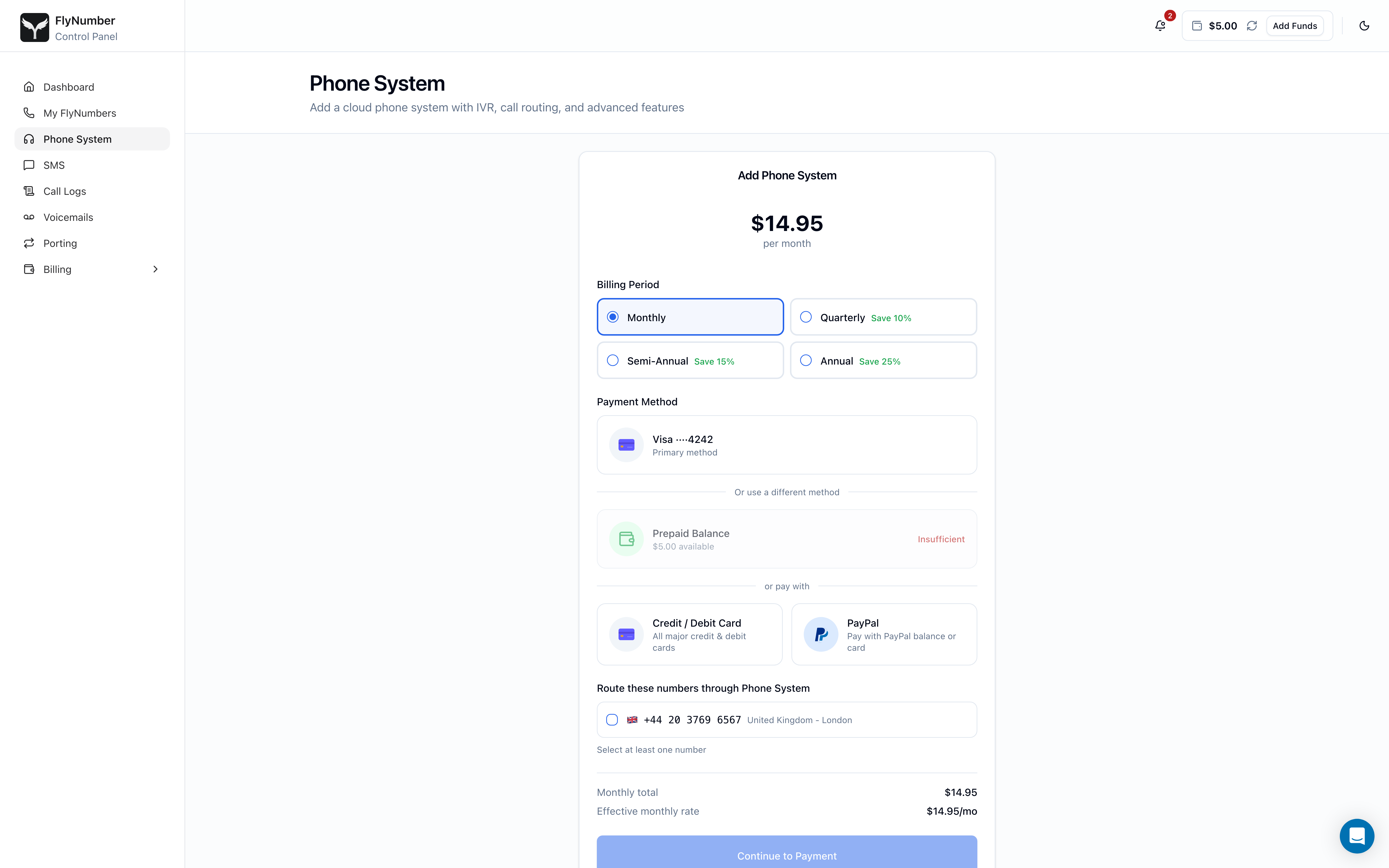
The form has four sections:
- Billing Period — Monthly / Quarterly / Semi-Annual / Annual. Longer terms discount the $14.95 rate (Quarterly 10% off, Semi-Annual 15%, Annual 25%).
- Payment Method — pick a saved card, your prepaid balance (if it has enough), or add a new card or PayPal.
- Route these numbers through Phone System — checkboxes for every FlyNumber on your account that isn't already on the phone system. You can pick one, several, or all of them. You can also route additional numbers later from each number's detail page.
- Total — final cost for the selected billing period.
Click Add Phone System. Provisioning usually completes within a few seconds, and the page transitions automatically to the active state once your phone system is ready.
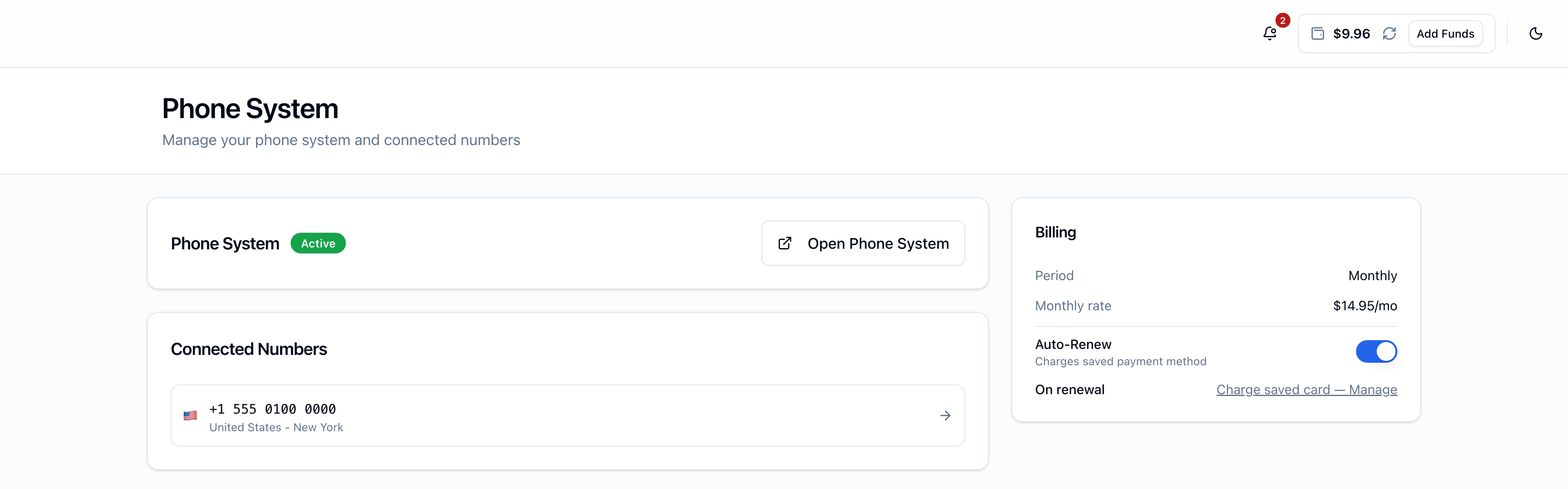
Routing an existing FlyNumber to the phone system
Once the phone system is active, any other FlyNumber on the account can be routed through it:
- Open My FlyNumbers in the sidebar → click the number you want to route.
- In the Call Handling card, select Phone System.
- Click Save Settings.
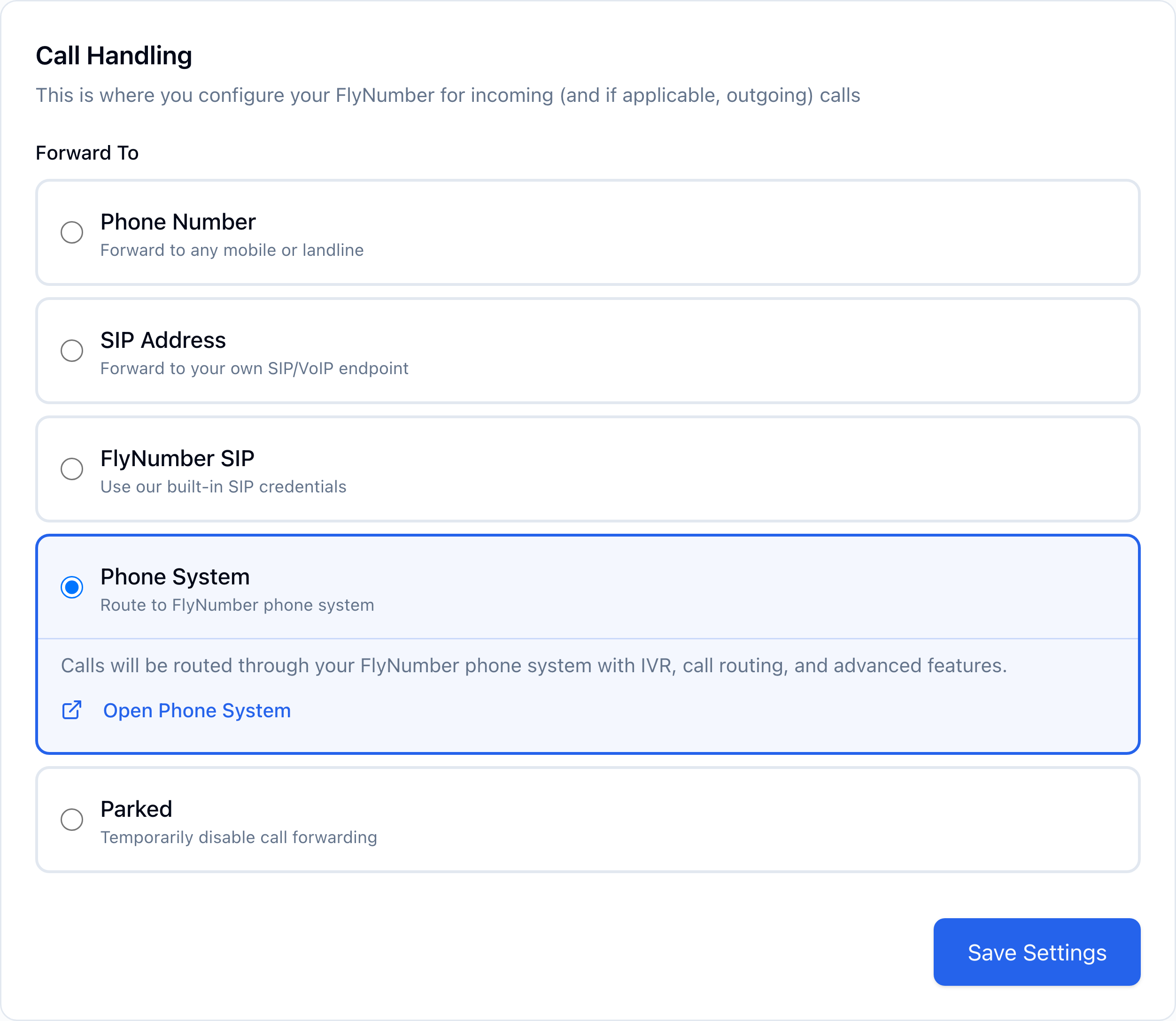
Removing a FlyNumber from the phone system is the reverse: pick a different option in Call Handling (Phone Number, SIP Address, FlyNumber SIP, or Parked) and save. The phone-system charge stays at $14.95/month even if you have only one connected number — or zero. If you remove every number from the phone system, the panel shows a banner reminding you nothing is currently routed through it.
Opening the phone-system interface
The Phone System page has an Open Phone System button at the top. Click it and we generate a single-use session token for the visual call-flow designer, which opens in a new tab. Inside, you drag modules onto a canvas and wire them with cables — changes apply immediately, no save or deploy step.
That usually means your session expired or the browser is holding onto a stale cache. Refresh the panel page and click Open Phone System again. If it persists, clear your browser cache and cookies for the panel.
First-time setup
When you open the phone system for the first time you'll want to:
- Create at least one user for call handling.
- Decide how calls reach that user — direct to the phone-system app, to a phone number, to a SIP softphone, or via a more elaborate call flow.
- Place a test call to one of your connected FlyNumbers to verify routing.
The full module reference, call-flow examples, and SIP account configuration live in the Phone System Guide.
Auto-renew and billing
The Billing card on the Phone System page shows your billing period, current monthly rate, Auto-Renew state, and a read-only On renewal row pointing at the account-wide setting in Billing Settings.
- Auto-Renew ON — at the end of the billing period, FlyNumber attempts to renew. If Charge saved card on renewal is on, your saved payment method is tried first and we fall back to prepaid balance if the card fails. If off, the renewal comes straight from prepaid balance. On success, the phone system extends for another period.
- Auto-Renew OFF — the phone system enters a 5-day grace period at the end of the billing period, then permanently expires if you haven't restored.
The phone system renews on its own schedule — independent of any individual FlyNumber's renewal date.
Grace period and restoration
If a phone-system renewal fails (auto-renew off, or every payment method failed), the phone system doesn't disappear right away. It enters a 5-day grace period during which:
- All your phone-system settings — IVR menus, ring groups, users, SIP accounts, time-based rules — stay alive on our side. Nothing is deleted yet.
- Every FlyNumber that was routed through the phone system is temporarily parked, meaning incoming calls aren't routed and the number is effectively offline until you restore.
- The Phone System page shows an amber warning with a countdown and a Restore Phone System button. The Open Phone System button is hidden during grace.
Restoring during grace
To bring the phone system back, click Restore Phone System on the warning card. Two things to know:
- Restoration is prepaid-only. A full billing period is charged from your prepaid balance — there's no proration, and saved cards aren't used for restoration. If your balance is short, the button is disabled with an "Add funds" link.
- The new expiry anchors to the original expiry. If you restore four days into the grace window on a Monthly plan, you're charged for one full month from the original expiry date — so the new expiry lands roughly 26 days out, not 30 days from today. For longer outages, multiple periods may be charged at once until the new expiry is in the future.
Once restoration completes, the phone-system settings reappear instantly (they were never deleted) and we re-route every previously parked FlyNumber back through the phone system — but only the ones still set to "Parked". If you changed a parked number's routing during the grace window (say, pointed it at a phone number instead), we respect that change.
Permanent expiry on day 5
If grace runs out without restoration, the phone system permanently expires:
- All your phone-system settings are deleted from our side (IVRs, users, SIP accounts, the works).
- Connected FlyNumbers stay in their parked state — you can manually switch them to a different routing option from each number's detail page.
- The Phone System page reverts to showing the Add Phone System form. You can purchase a fresh phone system anytime, but the old settings won't come back.
Auto-renew off is the most common reason for an unintentional expiry. If you want to keep the phone system around while you sort out billing, top up your prepaid balance enough to cover at least one period and turn auto-renew back on before the current period ends.
Outbound calls and forwarding charges
The flat $14.95/month covers the phone system itself. Outbound calls and any forwarding from inside a call flow to a regular phone number consume per-minute charges from your prepaid balance — rates vary by destination. See the per-minute rates page for the current pricing, and toll-free incoming rates for toll-free / metered FlyNumbers.
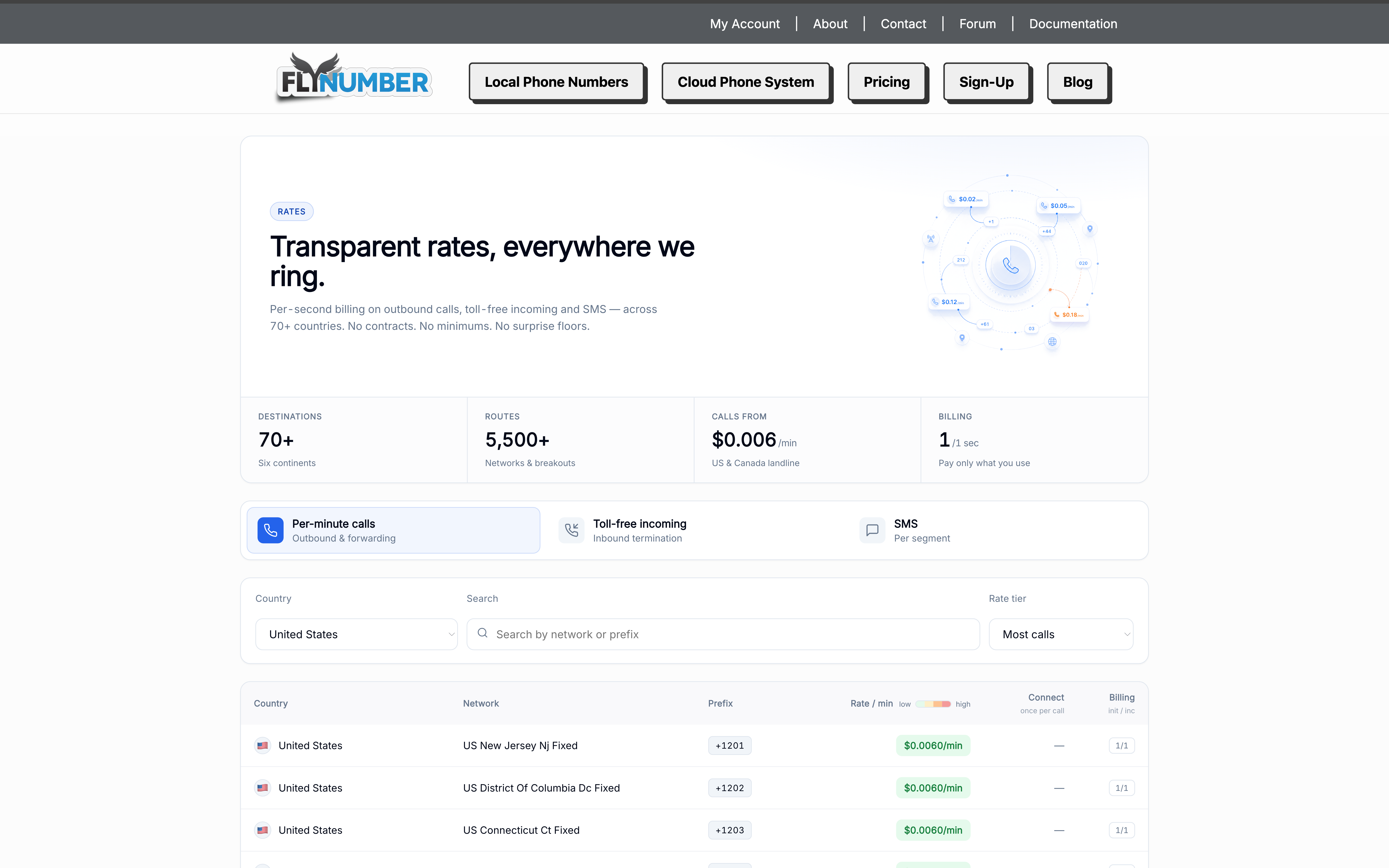
Keep an eye on your prepaid balance, especially if you have outbound traffic — running out of funds mid-call drops the call.
What's next?
- Phone System Guide — the visual call-flow designer, modules, SIP account setup, and example call flows.
- Add a FlyNumber — add more numbers to route through the same phone system (no extra phone-system charge).
- Billing overview — Auto-Renew, Charge saved card on renewal, switching billing periods.