FlyNumber SIP
FlyNumber SIP gives you a set of SIP credentials — server, username, password — that you plug into a softphone, desk phone, or any SIP-capable app. Your device registers directly to sip.flynumber.com, and your FlyNumber rings on it for incoming calls. Outbound calls (if enabled) leave with your FlyNumber as the caller ID.
It's the simplest path to making and answering calls on your FlyNumber without forwarding to a phone number, signing up with a third-party VoIP provider, or running a phone system. Each FlyNumber can have up to 5 SIP accounts, and your account holds 5 in total across every number — useful for ringing multiple devices, sharing the line with a team, or wiring up a softphone on your laptop and an app on your phone. To ring one softphone on several FlyNumbers, share a single account rather than spending another slot.
How it differs from the other options
| Option | Direction | Best for |
|---|---|---|
| FlyNumber SIP | Your device registers to FlyNumber | A softphone, app, or desk phone that connects directly — no external provider |
| SIP Address (Set to VoIP) | FlyNumber pushes calls out to your provider | Existing PBX, hosted VoIP service, or AI voice platform you already use |
| Phone Number (Forward to Number) | Calls forward to a regular phone | Mobile, landline, or any device on a phone line — including legacy intercoms, paging systems, and gate/garage controllers |
| Phone System | Routed through FlyNumber's cloud PBX | IVR menus, ring groups, voicemail, multi-user setups |
If you've been trying to forward to a VoIP endpoint that requires a username/password (rather than IP whitelisting), FlyNumber SIP is usually the cleaner fix — see the note in Set to VoIP.
Enabling FlyNumber SIP
You can switch a FlyNumber to FlyNumber SIP routing anytime — during the Add FlyNumber wizard or later from the number's detail page.
- Open My FlyNumbers in the sidebar → click the number you want.
- In the Call Handling card, select FlyNumber SIP.
- Click Save Settings.
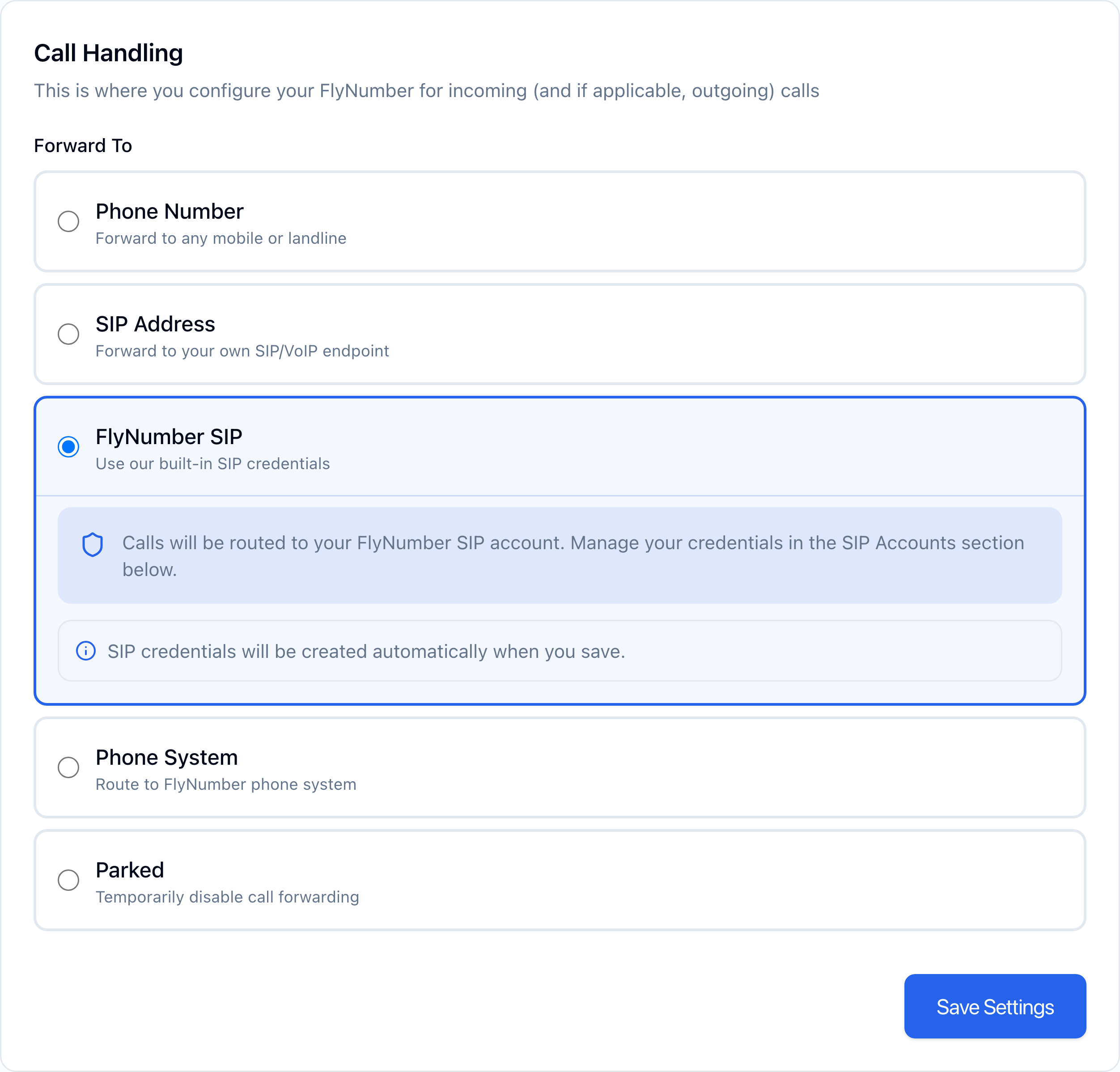
If this is the first time you've routed any number to FlyNumber SIP, a SIP account is created for you automatically — no extra step. You'll see a new SIP Accounts section appear below the Call Handling card once the change is saved.
Your SIP credentials
Each SIP account on a FlyNumber gets its own credentials, viewable in the SIP Accounts section.
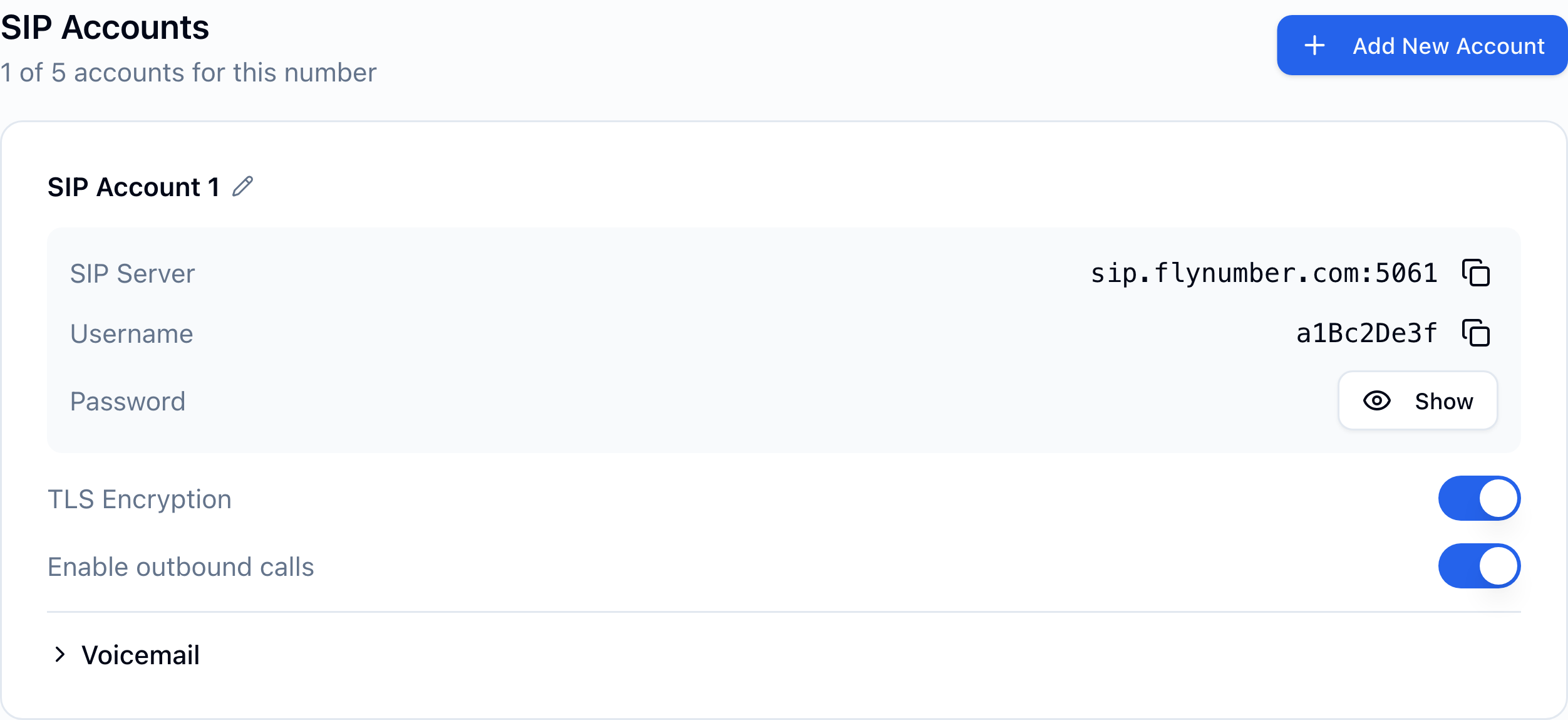
| Field | What it is |
|---|---|
| SIP Server | sip.flynumber.com — copy it into your client's server/domain field. |
| Port | 5061 when TLS Encryption is on, 5060 when it's off (UDP). Changes automatically with the TLS toggle. |
| Username | An auto-generated 9-character identifier (e.g., a1Bc2De3f). Copy with the icon next to it. |
| Password | Hidden by default. Click Show to reveal it — we fetch it fresh from our server each time. Click the copy icon to copy. |
| TLS Encryption | Toggle for transport. ON = TLS + SRTP on port 5061 (recommended). OFF = UDP on port 5060, no encryption (for older hardware that can't do TLS). |
| Enable outbound calls | When ON, you can make outbound calls from this SIP account — they leave with your FlyNumber as the caller ID and consume your prepaid balance at the per-minute rates. |
TLS encrypts the signaling channel and SRTP encrypts the audio. Anything modern — softphones like Zoiper, Linphone, MicroSIP, Acrobits Groundwire, or modern desk phones — supports it. Only flip TLS off if you're connecting hardware that genuinely can't, then expect to use port 5060 instead of 5061.
Set it in the panel first. Match the client's transport and port to the panel: TLS on 5061 when TLS Encryption is on, UDP on 5060 when it's off. Mismatched either way, it won't connect. To switch, flip the toggle first, then update every client.
Refreshing the password
If you suspect a credential leak or need to rotate it, click Show then Refresh Password. We generate a new password immediately — your existing SIP clients will deregister until you update them with the new value. There's no notice period or grace, so refresh during a window when you can update every device.
A client left on the old password keeps retrying in the background, and enough failed attempts temporarily block that network's public IP from our SIP service. Update or remove the credentials in every client — the same applies when you delete an account. See Everything times out on one network.
Naming an account
The default label is SIP Account 1, SIP Account 2, and so on. Click the pencil icon next to a label to rename it — handy when you have multiple accounts ("Laptop", "Office Phone", "Sarah's Mobile", etc.).
Multiple SIP accounts on one FlyNumber
Click Add New Account at the top of the SIP Accounts section to issue a second (or third…) set of credentials. Up to 5 per FlyNumber, and 5 across your whole account.
Once you have two or more accounts, an Incoming Call Flow card appears with ring-routing controls:
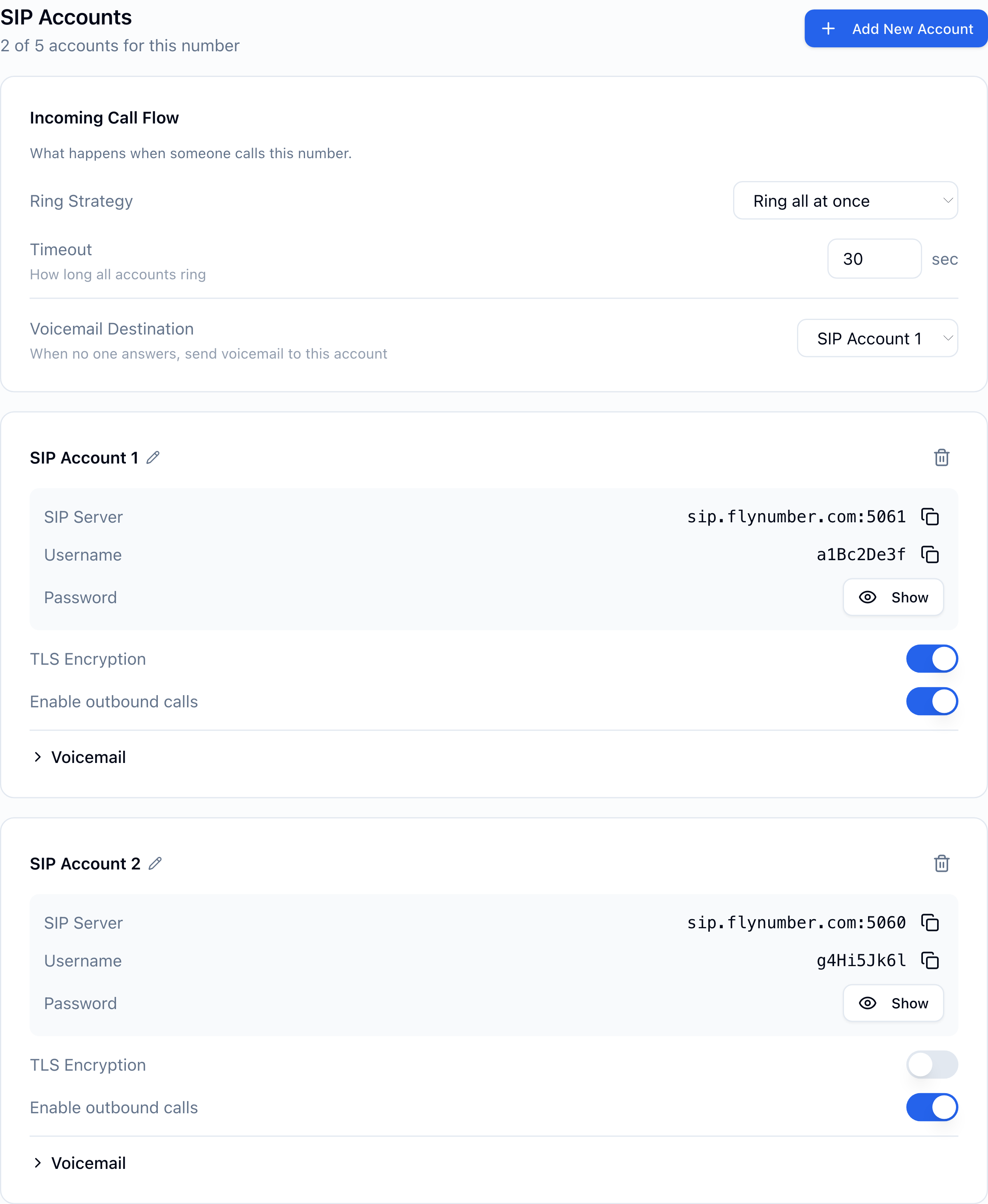
| Setting | Details |
|---|---|
| Ring Strategy — Ring all at once | Every SIP account rings simultaneously. First device to answer takes the call. |
| Ring Strategy — Ring one after another | Accounts ring in order. Each one rings for the Timeout seconds, then the next account takes over. |
| Timeout | 5–120 seconds. For "all at once" this is how long the whole group rings; for "one after another" it's per-account. |
| Voicemail Destination | Which account's voicemail picks up if nobody answers. Set this once per number — see Voicemail below. |
Ring one after another (sequential)
In sequential mode, each account ringing slot can be dragged into the order you want.
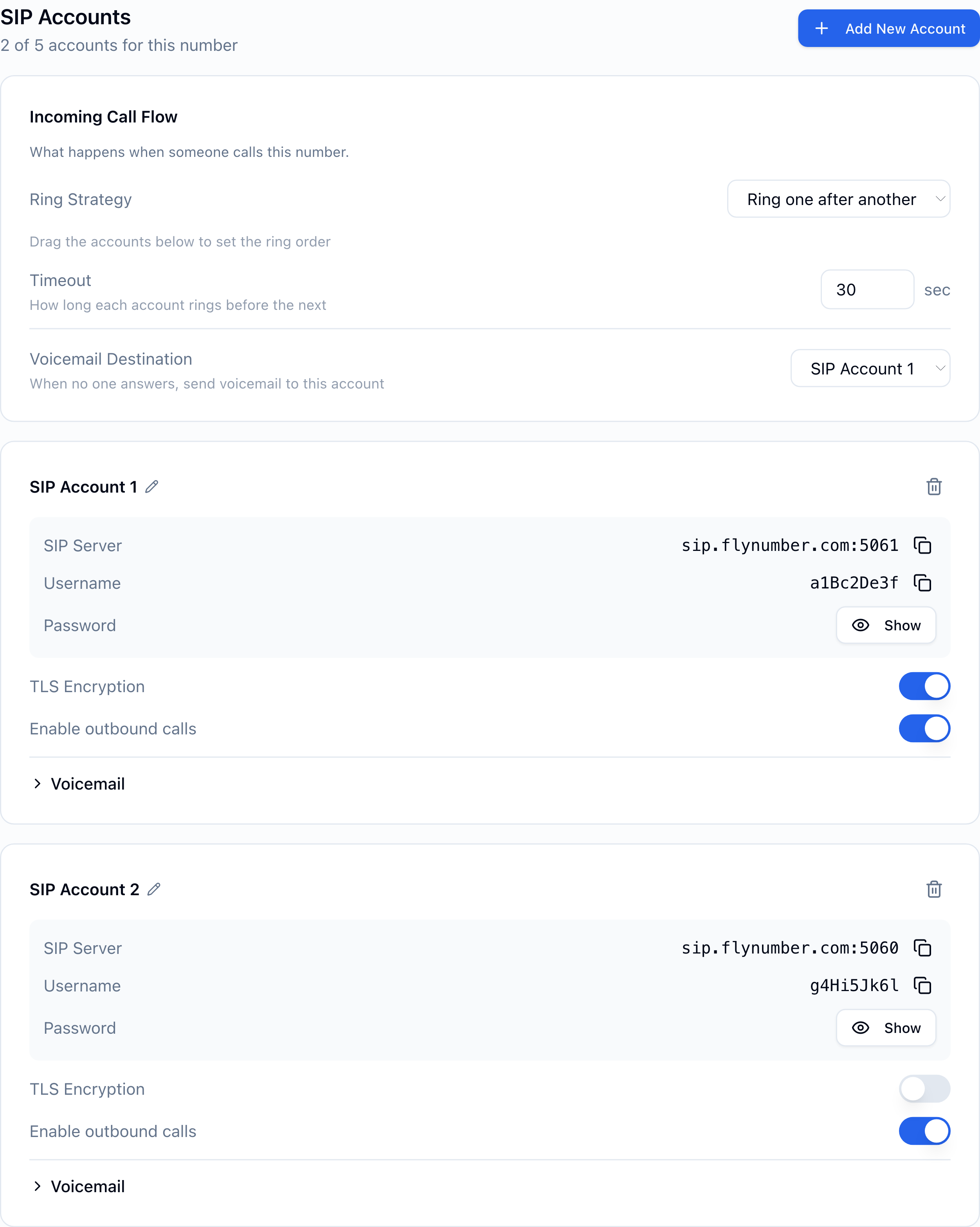
The numbered badge on each card matches the position in the ring order. Drag the grip handle (⠿) on the left to reorder. Changes save as soon as you drop.
Sharing an account across multiple FlyNumbers
If you have several FlyNumbers and want them all to ring the same softphone (so the SIP client only registers once), you can attach the same SIP account to multiple numbers.
On the second number's detail page, in the SIP Accounts section, click Use Existing Account (visible when you already have an account on another number). Pick the account you want to share, and it gets linked — same credentials, no second registration needed in your softphone.
Shared accounts get a sky-blue accent on the card, with pills showing every FlyNumber the account rings on. Things to know:
- Per-number ring order and voicemail. The ring strategy, ring timeout, and voicemail destination are set per FlyNumber. The shared account's credentials and outbound settings are global.
- Outbound caller ID. When the same SIP account can make outbound calls on behalf of multiple FlyNumbers, a "When calling out, show" dropdown appears so you can pick which number is shown as caller ID.
- Removing an account. Removing a shared account from one number only unlinks it — its credentials stay live for the other numbers. Removing a non-shared account deletes it. Clear deleted credentials from every softphone straight away; retries on a dead username can trigger an IP block.
Voicemail
Voicemail on a FlyNumber SIP number is controlled in two places, and they do different jobs:
| Where | What it controls |
|---|---|
| Voicemail card on the number's detail page (below SIP Accounts) | Whether this number takes a message at all — one switch per FlyNumber |
| Voicemail section on each SIP account card | How messages are handled once taken — notification email, audio attachment, greeting |
Turning voicemail on or off for a number
The Voicemail card sits under the SIP Accounts section. Flip the switch to choose what happens when nobody picks up:

- On — the caller is sent to voicemail after the ring timeout and can leave a message.
- Off — unanswered calls end without recording a message; the caller just hears ringing until they give up.
The switch saves immediately. It lives on the number rather than on a SIP account because one SIP account can be shared across several FlyNumbers — a per-account switch could silently change voicemail on a different number too.
Per-account voicemail settings
Click Voicemail on a device card to expand its settings:
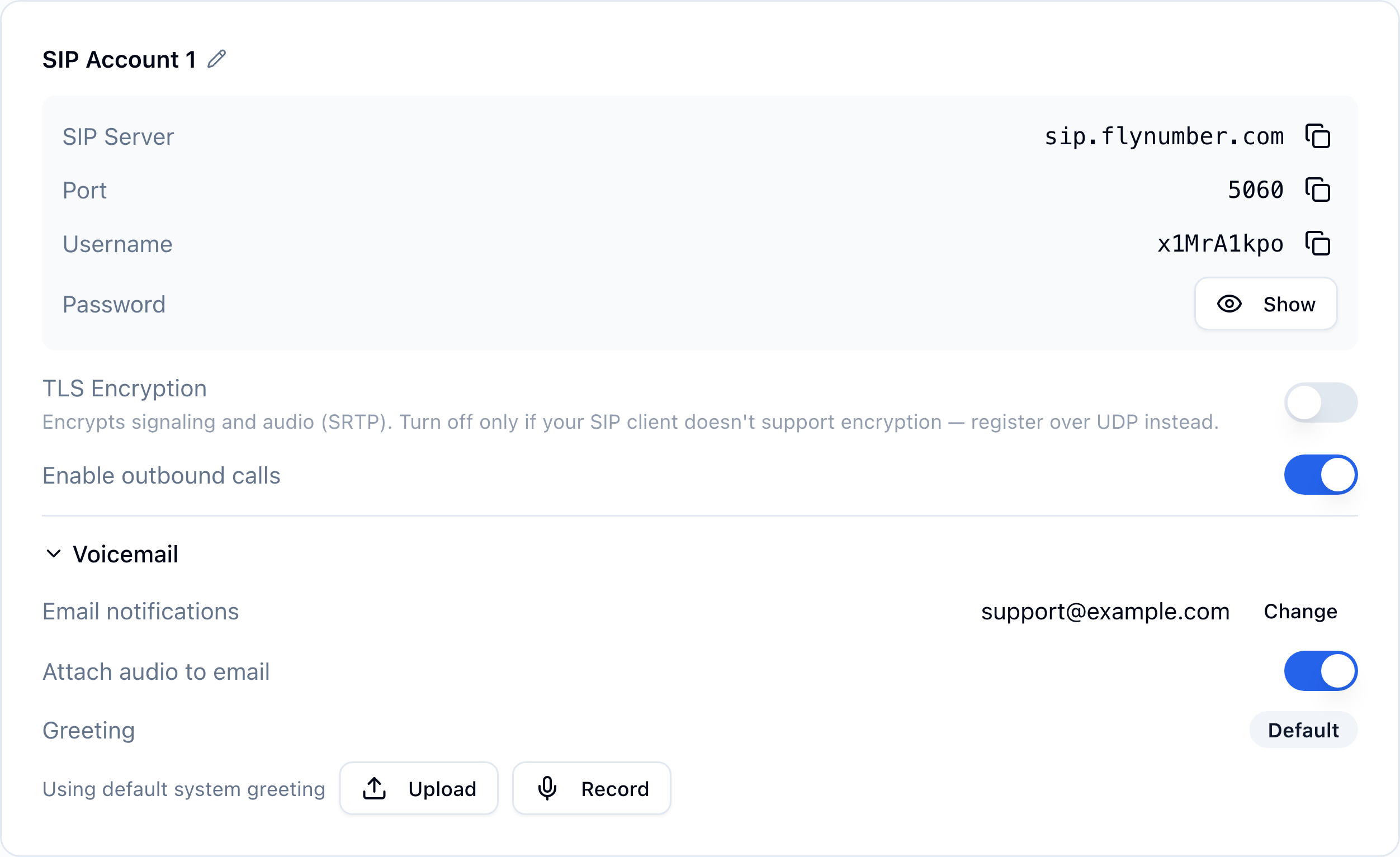
| Setting | Details |
|---|---|
| Email notifications | Address that receives "you have a voicemail" emails. Defaults to your account email; change to anything else and we send a verification link before activating the new address. |
| Attach audio to email | When ON, the voicemail recording is attached to the email as a .wav file. When OFF, the email just has the metadata and a link to the Voicemails page in the panel. |
| Greeting | Upload a .wav or .mp3, or record one directly in the browser. Leave on Default to use the system greeting. |
Recent voicemails for the account appear under the greeting controls, with a link to the full Voicemails page.
Voicemail destination on multi-account numbers
When a FlyNumber has 2+ SIP accounts, all the devices ring on an incoming call (per the ring strategy), but only one account's voicemail picks up if nobody answers. That's set via Voicemail Destination in the Incoming Call Flow card. Each account still has its own voicemail settings — but only the chosen one is reached on this FlyNumber, and only if the number's Voicemail switch is on.
Outbound calls
Toggle Enable outbound calls on a SIP account and you can dial out from any softphone registered to it. Calls go out with your FlyNumber as the caller ID, and per-minute charges deduct from your prepaid balance.
If a SIP account is shared across FlyNumbers and outbound is enabled, a "When calling out, show" dropdown lets you pick which connected FlyNumber appears as the caller ID.
Dialing format
Always dial in full international format — country code first, then the number. Three equivalent styles work; use whichever your softphone produces:
| Style | Example (UK Leeds landline) |
|---|---|
| Country code + number | 441138709191 |
Leading + | +441138709191 |
Leading 00 | 00441138709191 |
All three connect identically. The rules that trip people up:
- Don't dial in national format. A UK number written locally as
0113 870 9191won't connect if you dial01138709191— drop the leading0(the national trunk prefix) and add the country code:441138709191. Same idea for any country whose local numbers start with0. - US/Canada: dial
1+ the 10-digit number —12125551234or+12125551234. Don't omit the leading1, and don't double it (112125551234fails). - Don't add other prefixes such as the North American
011— stick to the three styles above.
If an outbound call fails immediately, check in this order:
- Number format — full international format per the rules above.
- Prepaid balance — outbound calls bill per-minute from your prepaid balance, so a $0 balance blocks the call.
- Outbound enabled — the Enable outbound calls toggle is ON for the SIP account.
- Media encryption — if you connect over TLS, your client must also have SRTP enabled, or calls are rejected the moment you place them. See Troubleshooting.
Outbound calls run off your prepaid balance, not your saved card. If you hit $0 mid-call, the call drops. Top up via Add Funds, or enable Auto-Refill to keep the balance above a threshold automatically.
Setting up a softphone
The exact UI varies by app, but every SIP client asks for the same four things:
| Field | Value |
|---|---|
| SIP Server / Domain / Host | sip.flynumber.com |
| Port | 5061 (TLS) or 5060 (UDP) |
| Transport | TLS (recommended) or UDP |
| Username / Auth user | The username from your SIP Accounts card |
| Password | The password from the Show button |
Most clients also expose a Display Name field — it's cosmetic, set it to whatever you like.
Leave the outbound proxy blank — FlyNumber doesn't need one — and ICE off.
Turn STUN on. Plenty of networks work without it, but on some your client registers an address we can't send calls back to, and there's no warning when that happens: registration succeeds, outbound calls work, and incoming calls just never ring. STUN costs nothing when it isn't needed. See Registered, but incoming calls never arrive.
Per-client gotchas
The four fields above are enough to register. Below are the small differences each popular client adds — useful when you're stuck.
Zoiper (Mac / Windows / iOS / Android)
- Add Account → Manual Configuration → SIP.
- Transport lives under Settings → Accounts → (account) → Network Settings.
- Codecs: enable PCMA and PCMU only; disable everything else (FlyNumber supports G.711 only — keeping Opus/G.722 on causes negotiation failures).
- For TLS: enable "Use SRTP" / "Encrypt audio (SRTP)". Mode should be SDES (not DTLS-SRTP, which isn't supported).
- DTMF: RFC 2833 / RFC 4733 (out-of-band). Not SIP INFO, not inband.
Linphone (Mac / Windows / Linux / iOS / Android, open source)
- Account Assistant → Use a SIP account.
- Server address:
sip.flynumber.com. Transport via the dropdown — Linphone defaults to TLS if you don't pick one, so if you actually want UDP, set it explicitly. - Codecs: in Audio settings, leave G.711 µ-law and A-law on; turn the rest (including Opus, which Linphone enables by default) off.
- For TLS: Account settings → Advanced → Media encryption = SRTP (not ZRTP, not DTLS).
Acrobits Softphone / Groundwire (iOS / Android)
- Server:
sip.flynumber.com. Username + password from the card. - Transport: Network → Transport Protocol → UDP or TLS. This is an advanced setting; it's easy to miss.
- For TLS: Network → Encryption → "Required" (or "Optional" if you sometimes use UDP). Required pairs with SRTP automatically.
- Codecs: Audio Codecs → restrict to PCMA + PCMU.
- NAT: set NAT traversal to STUN rather than leaving it on "Auto" — see Registered, but incoming calls never arrive.
Bria (Counterpath, Mac / Windows / iOS / Android)
- Account → SIP → SIP Account. Set both Server and Domain to
sip.flynumber.com. - Transport tab: UDP/5060 or TLS/5061.
- Media → Audio Codecs: G.711a and G.711u only.
- For TLS: Security tab → enable certificate validation. The FlyNumber TLS certificate is from Let's Encrypt and validates cleanly against any standard CA store.
- For TLS, also turn on SRTP. Bria keeps media encryption separate from transport — enabling TLS alone is not enough, and calls are rejected without it. Set the account's media encryption to SRTP (SDES), not DTLS-SRTP.
MicroSIP (Windows)
- Account → Add Account.
- Transport dropdown: UDP or TLS.
- Username + Auth username are the same value (the username from the card).
- For TLS: set the account's media encryption to SRTP (labelled "Media Encryption" or "SRTP" depending on version). TLS on its own encrypts only signaling — without SRTP the call is rejected.
- Codecs: under Settings → Codecs, keep PCMA and PCMU enabled, disable the rest.
Hardware desk phones (Yealink, Cisco, Polycom, Grandstream)
- Configure the SIP/VoIP account page with
sip.flynumber.comas the server, username and password from the card. - TLS: modern hardware phones support TLS but the device may need a Let's Encrypt root CA in its trust store. Most phones from the last few years bundle the standard CA list and work out of the box; older units may need a CA upload. The server certificate is issued by Let's Encrypt and renews automatically, so trust the root rather than pinning an intermediate.
- For TLS, also enable SRTP. On most firmware this is a separate setting from the transport — look for "SRTP", "RTP Encryption", or "Secure RTP" on the account page, and choose SDES rather than DTLS-SRTP. Calls are rejected if the transport is TLS but SRTP is off.
- DTMF: set to RFC 2833 (sometimes labeled "RTP-event").
- Codecs: enable G.711a and G.711u; disable G.722, G.729, Opus, iLBC.
- Keepalive: hardware phones behind NAT often need a SIP keepalive — set to 60 seconds if the default doesn't keep the registration alive.
FreePBX, Asterisk, FreeSWITCH, 3CX (PBX as the SIP client)
- Register the FlyNumber SIP account as an outbound SIP trunk on the PBX. The PBX is the SIP client here — same fields apply.
- For inbound DID routing: FlyNumber sends the call into the trunk, the PBX dialplan routes it to the right extension.
- Codecs: restrict trunk allow-list to
ulaw, alaw(G.711 only). - DTMF: set the trunk to RFC 2833 / RFC 4733 mode.
- For TLS trunks, enable SRTP too. Most PBXes configure media encryption separately from the trunk transport (Asterisk/FreePBX:
media_encryption=sdes). A TLS trunk with encryption left off registers fine and then fails every call. - NAT settings on the PBX: make sure the PBX knows its external IP and the local network so SDP rewrites work. SIP ALG on routers in front of the PBX is a common audio-killer — disable it.
Troubleshooting
Registered, but incoming calls never arrive
Your client says Registered, outbound calls work, and inbound calls simply never ring — the caller hears ringing until they give up, and no failure shows in Call Logs.
This is usually the address your client registered. Some clients hand us their private address (10.x, 172.16–31.x, 192.168.x) rather than the public one their router uses. Registering only has to reach us, so it succeeds; the call back to you has nowhere to arrive.
Fix: enable STUN in your client, so it advertises an address we can reach. If it asks for a server, use the one the app recommends; if it suggests none, try stun.l.google.com:19302. Save and let it re-register.
Still nothing? Send support your SIP username and we'll tell you which address your device registered.
Everything times out on one network, but works on mobile data
If the same credentials time out over UDP, TCP and TLS from one location but connect right away on a phone hotspot or another connection, that network's public IP may be blocked by our brute-force protection.
The usual trigger is a device still running credentials you changed. Deleting a SIP account or refreshing its password doesn't touch the app that had them, so it keeps retrying. Three attempts on an unknown or deleted username within 10 minutes block the IP from our SIP server for 24 hours, on every port — so even your working accounts go dark. Five wrong-password attempts within 10 minutes trigger a 12-hour block.
- On every device on that network, remove deleted SIP accounts and update changed passwords in the app itself — a panel change doesn't reach the client. One forgotten tablet keeps re-triggering it.
- Ask support to lift the block. Send your SIP username and that network's public IPv4 address (search "what is my IPv4" while connected to it).
Clear the stale clients first: three blocks within 24 hours trigger a 7-day one.
"Registration failed" or "401 Unauthorized"
Double-check the username and password — copy them straight from the SIP Accounts card rather than re-typing. If you recently used Refresh Password, the old password is invalid; update every device with the new one.
Registration succeeds, but calls over TLS fail immediately
Your client shows as registered, but every outbound call ends the instant you place it — often with 488 Not Acceptable Here, or with no error beyond the call disappearing. Nothing shows up in Call Logs, because the call is refused during setup and never actually gets placed.
The usual cause is media encryption. Over TLS the audio must be encrypted with SRTP using SDES keying, and the call is rejected outright if the client doesn't offer something usable. Any of these will do it:
- media encryption switched off in the client,
- encryption set to DTLS-SRTP or ZRTP (neither is supported — use SDES),
- an SRTP suite the server doesn't accept.
Fix it in your client's media encryption setting — see your client's setup steps above. To confirm nothing else is wrong, you can temporarily turn TLS Encryption OFF in the panel and connect over UDP on port 5060, which doesn't require SRTP.
Phone rings briefly then drops, or no audio
Usually a transport mismatch. If TLS Encryption is ON in the panel, your softphone must be configured for TLS on port 5061. Some clients default to UDP, which won't match the panel setting. Flip your client to TLS or, as a temporary test, turn TLS Encryption OFF in the panel and use UDP on port 5060.
Outbound calls fail with "Forbidden" or "Service not available"
First check the number you dialed is in full international format — country code + number, with no national trunk prefix (see Dialing format). Then check that Enable outbound calls is ON for the SIP account and that your prepaid balance is above $0.
Calls ring on the panel's voicemail but never reach my softphone
Confirm the softphone is showing as registered in its own status indicator. If it's behind a strict firewall or NAT, you may need to keep the registration alive with shorter intervals (most clients have a "Register expires" or "keep-alive" setting — set it to 60 seconds).
If it is registered and calls still never land, the registered address is the likely problem — see Registered, but incoming calls never arrive.
Calls connect but one side can't hear the other
One-way (or no) audio almost always means RTP media isn't getting through your network. The usual culprits, in order of likelihood:
- SIP ALG enabled on your router. Disable it. SIP ALG attempts to rewrite SIP messages on the fly and breaks SIP-over-NAT in subtle ways. Most home routers ship with it on.
- UDP RTP ports blocked by a firewall. Your softphone needs an open path for inbound RTP audio. If you're behind a corporate firewall, open the UDP range your client uses for media (clients typically pick a port in the 10000–40000 range). Note that a media-encryption problem does not look like this — an SRTP mismatch is rejected while the call is still being set up, so the call never connects at all. If your calls die the instant you place them, see "Registration succeeds, but calls over TLS fail immediately" above instead.
Calls drop after about 30 seconds with no audio
If audio never started in the first place (one-way or no audio), the call gets torn down once no RTP has arrived for a while — most clients give up well before the server does, and the exact timing depends on your client. The fix is the same as one-way audio above: disable SIP ALG and check your firewall rules.
TLS handshake fails
Two common causes:
- TLS version mismatch. FlyNumber requires TLS 1.2 or TLS 1.3. Very old softphones or hardware phones may still try TLS 1.0/1.1 — upgrade the client, or fall back to UDP.
- Missing Let's Encrypt CA. The server certificate is issued by Let's Encrypt. Modern devices have the Let's Encrypt root in their CA store; hardware phones from before ~2020 may need the root certificate uploaded manually. As a quick workaround, disabling certificate validation in the client (where it lets you) confirms the cert is the problem; then add the proper CA bundle.
Technical reference
A power-user spec sheet for SIP integrators wiring up hardware phones, PBX trunks, or anything else that needs to know the protocol details.
| Spec | Value |
|---|---|
| SIP server | sip.flynumber.com (IPv4 only — no AAAA record) |
| UDP port | 5060 |
| TLS port | 5061 |
| TLS versions | TLS 1.2, TLS 1.3 |
| Server certificate | Let's Encrypt. Subject CN: sip.flynumber.com. Auto-renewing — validate against the Let's Encrypt root in your CA store rather than pinning an intermediate, which changes over time. |
| SRV records | Not published — configure clients with the explicit host and port above. |
| Audio codecs (supported) | G.711 µ-law (PCMU), G.711 A-law (PCMA) |
| DTMF mode | RFC 2833 / RFC 4733 (telephone-event), payload type 101 |
| SRTP | Required when registered over TLS. SDES key exchange. AES-CM 128/192/256 with HMAC-SHA1 80/32, plus AEAD AES 128/256 GCM. |
| RTP port range (server) | UDP 16384 – 32768 |
| Registration expiry | Client-driven — server doesn't push OPTIONS keepalives. Most clients set this between 60 and 3600 seconds. |
| NAT traversal | Honors rport (RFC 3581). A client that registers a private Contact address (10.x, 172.16–31.x, 192.168.x) receives no inbound calls — enable STUN. No outbound proxy needed. |
| Authentication | SIP digest auth (RFC 3261). Registration username must match auth username. |
| Rate limit | 25 new SIP connections per minute per source IP (designed to stop scanning attacks; generous for real clients). |
| Failed-auth lockout | Three registrations for an unknown username within 10 minutes block the source IP from all ports on our SIP server for 24 hours. Five wrong-password attempts within 10 minutes trigger a 12-hour block. Three blocks within 24 hours trigger a 7-day block. |
| Username format | Auto-generated 9-character alphanumeric. Older accounts may have 10-digit numeric usernames — those still work. |
Sample client config
Domain / SIP server:  sip.flynumber.com
Username:             <from panel>
Auth username:        <same as username>
Password:             <from panel>
Transport:            UDP   (or TLS)
Port:                 5060  (or 5061 for TLS)
Outbound proxy:       (leave blank)
STUN:                 enabled  (set a server if the client asks for one)
ICE:                  disabled
Audio codecs:         PCMA, PCMU
SRTP:                 Optional (UDP) / Required (TLS)
DTMF:                 RFC 2833
Register on startup:  yes
What's not supported
Avoid wasted setup time — these are intentionally out of scope:
- IPv6 SIP. FlyNumber's SIP server listens on IPv4 only. Use an IPv4 address on your client.
- Video calls. SIP video signaling and RTP video are not supported. Audio only.
- Wideband codecs — G.722, Opus, AAC-LD. PCMU and PCMA only.
- Low-bandwidth codecs — G.729, iLBC, GSM, Speex. PCMU and PCMA only.
- DTLS-SRTP. Use SDES (the SIP standard, supported by every modern client).
- SIP INFO DTMF and inband DTMF. Use RFC 2833 / RFC 4733.
- Outbound proxy in front of
sip.flynumber.com— connect directly. - Custom server hostnames or ports per account. Everyone uses
sip.flynumber.comon 5060 / 5061. - Mutual TLS / client certificates. Standard username/password auth over TLS is sufficient.
What's next?
- Voicemails — full inbox view, playback, download, delete.
- Add Funds — keep your prepaid balance topped up if you make outbound calls.
- Phone System — graduate to IVR menus, ring groups, and time-based routing when one-FlyNumber-per-account isn't enough.