Create an Agent
Everything about AI voice agents lives under AI Voice Agents in the panel sidebar, marked Beta. This page covers creating an agent, finding your way around the editor, and the Agent tab.
The AI Voice Agents page
The page lists each of your agents as a card. Under the page title you'll see the price, and above the cards a count such as 2 of 10 agents · 1 live.
Each card shows:
- Status as a colored stripe and label: Live, Pending, Draft or Suspended. See what each status means. Unpublished changes appears next to it when you've saved changes that aren't published yet.
- The agent's name.
- Which numbers it answers: Answering +1 …, or Not answering a number yet.
- Opens with: the agent's opening line, or Waits for the caller to speak if it has none.
- How many rules it has, and when it was last updated.
Click a card to open that agent.
Create an agent
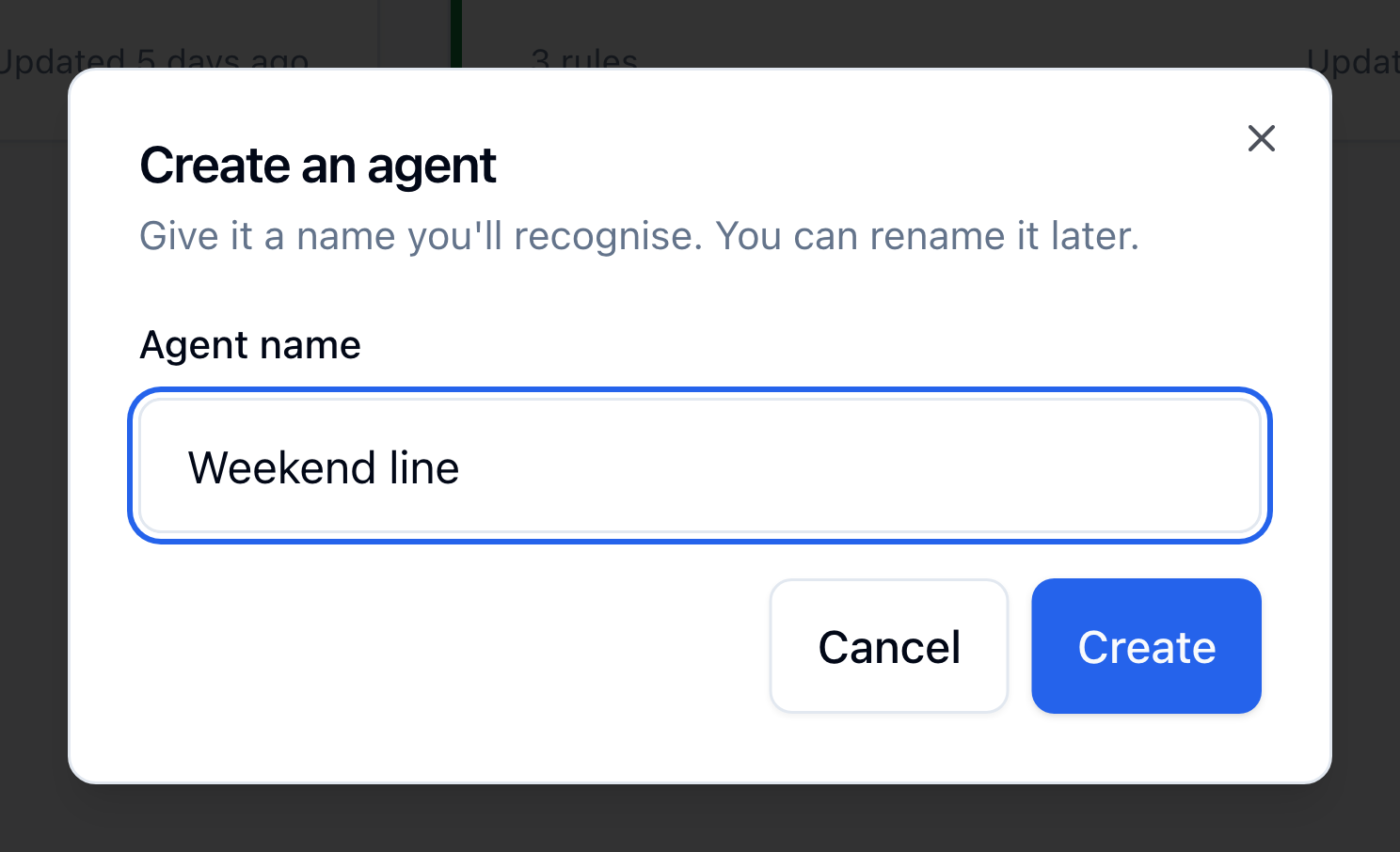
- Click the Create an agent tile, the last card on the page. (If you don't have any agents yet, the tile reads No agents yet.)
- Type an Agent name, up to 80 characters. The name is for you; it helps you pick the agent later in a number's call handling. You can rename it at any time.
- Click Create. The agent's editor opens on the Agent tab.
You can have up to 10 agents. When you reach 10, the create tile no longer appears; delete an agent to make room for another.
What a new agent starts with
A new agent isn't empty. It starts with settings you can keep or change. The sample text is in English; if your agent should speak another language, translate it or clear it (see Greeting language):
| Setting | Starts as |
|---|---|
| Who does the agent answer calls for? | The agent's name. Replace it with a real description (see below) |
| How should the agent behave? | You are a friendly, concise phone receptionist. |
| Voice | Marin |
| Greeting language | English |
| Opening line | How can I help you today? |
| Rules | A Take a message rule and an End the call rule (details) |
| What should the agent know? | Empty |
| Transfer targets | None |
The editor
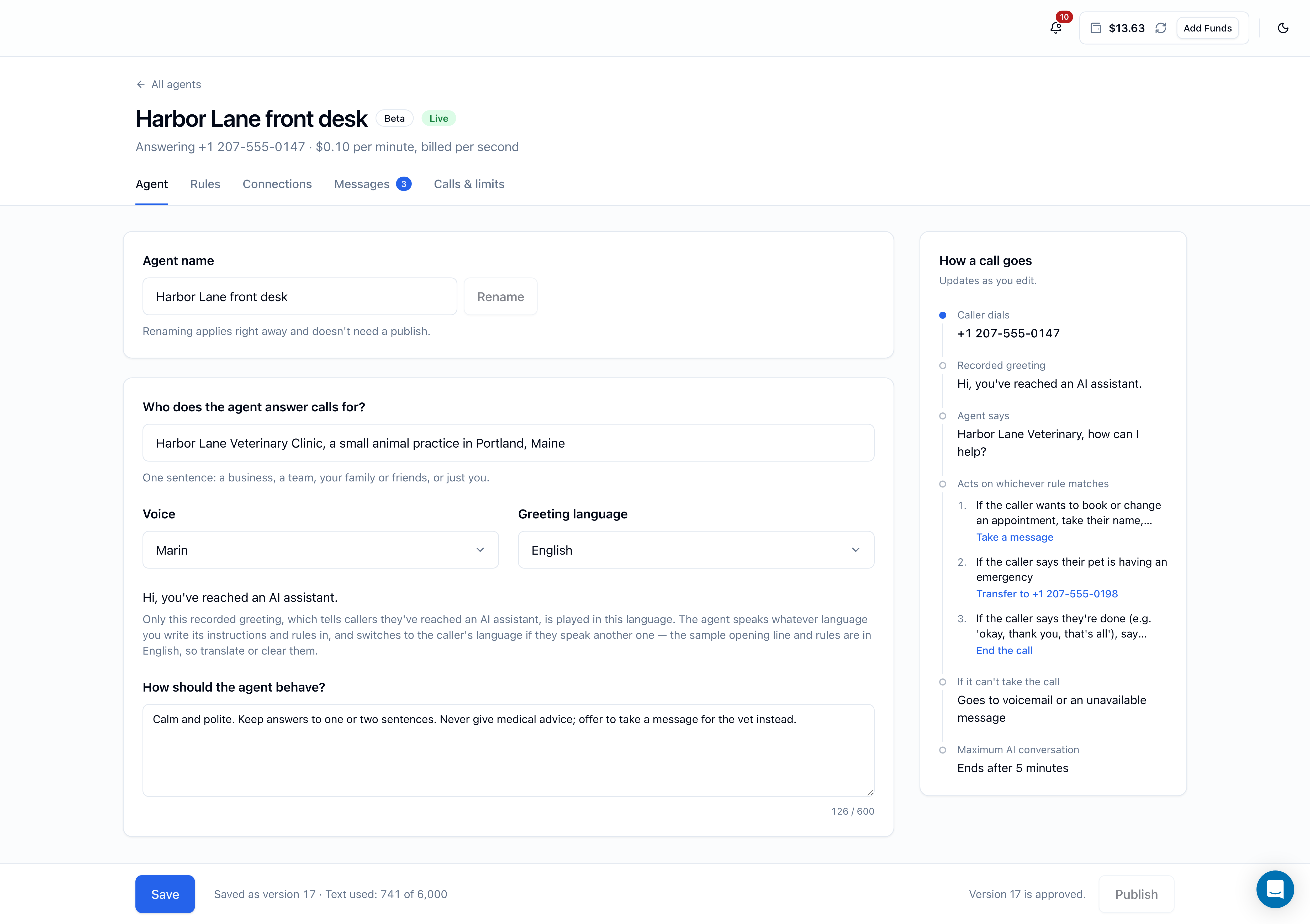
The top of the editor shows the agent's name, a Beta label, its status, the numbers it answers, and the price. Below that are five tabs:
| Tab | What's on it |
|---|---|
| Agent | Name, who the agent answers calls for, voice, greeting language, how it should behave |
| Rules | The opening line and the agent's rules. See Rules and opening line |
| Connections | What the agent should know, and transfer targets. See Knowledge and transfers |
| Messages | Messages callers left, with a count on the tab. See Messages |
| Calls & limits | Settings that apply right away, recent calls, and deleting the agent. See Pricing, limits and settings and Call history |
On the Agent, Rules and Connections tabs, a How a call goes panel sits beside the form. It walks through a call with your current settings (the number dialed, the recorded greeting, your opening line, your rules, where callers go if the agent can't take the call, and the 5-minute limit) and updates as you edit.
A bar pinned to the bottom of the page holds Save and Publish. See Saving and versions.
The Agent tab
| Field | What to enter | Limit |
|---|---|---|
| Agent name | A name you'll recognize. Click Rename to apply it. Renaming takes effect right away and doesn't need a publish | 80 characters |
| Who does the agent answer calls for? | One sentence: a business, a team, your family or friends, or just you | 200 characters |
| Voice | Marin, the one voice offered during the beta | — |
| Greeting language | The language of the recorded greeting. See Greeting language | — |
| How should the agent behave? | Tone, manner, and anything it should never do | 600 characters |
Who does the agent answer calls for?
This tells the agent whose phone it's answering. One plain sentence is enough:
- Harbor Lane Veterinary Clinic, a small animal practice in Portland, Maine
- The IT help desk at Meridian Logistics
- Dana Ortiz, an independent translator
The agent uses this when it talks to callers, so write it the way you'd want it said.
How should the agent behave?
Describe the manner you want, and set boundaries. For example:
Calm and polite. Keep answers to one or two sentences. Never give medical advice; offer to take a message for the vet instead.
Put facts (hours, prices, addresses) in What should the agent know? on the Connections tab rather than here. Put actions (take a message, transfer) in rules.
Greeting language
Greeting language sets the language of the recorded greeting that tells callers they've reached an AI assistant. There are 16 to choose from: English, Arabic, Chinese (Mandarin), Dutch, French, German, Hebrew, Hindi, Italian, Japanese, Korean, Polish, Portuguese (Brazil), Russian, Spanish and Turkish. The sentence callers will hear appears under the menu.
Only the recorded greeting is played in the language you pick. Everything else the agent says follows the text you write:
- Before the caller speaks, the agent uses the language of your opening line. If the opening line is empty, it uses your first rule, and if there are no rules, your behavior text.
- Once the caller speaks another language, the agent switches to it.
The opening line, rules and behavior text a new agent starts with are in English. If your agent should speak another language, translate them or clear them, then save.
The greeting language is part of the saved version, so a change reaches callers after you Save and Publish. There's one voice, Marin, for every language. How well the agent speaks varies by language, so once a number is connected, place a few test calls in your language before you share the number.
Saving and versions
Changes on the Agent, Rules and Connections tabs are saved together as a numbered version:
- Make your changes on any of the three tabs.
- Click Save in the bar at the bottom. You'll see Saved as version 4 (or whichever number it is). If nothing changed, you'll see No changes to save.
Saving doesn't change what callers hear. A saved version only reaches callers when you publish it. While there are edits you haven't saved, the bar reads Unsaved changes.
If a required field is empty or something doesn't pass a check, Save opens the tab with the problem and shows a message under the field, such as Say who the agent answers calls for or Tell the agent how to behave.
Two kinds of changes apply right away, with no Save or Publish:
- Renaming the agent.
- The Settings on the Calls & limits tab (hidden callers, fallback phone number, monthly ceiling). See Settings.
Text used
Next to Save, the bar shows Text used: X of 6,000. This measures the total size of the instructions the agent works from: everything you've written on the Agent, Rules and Connections tabs, plus some fixed instructions every agent gets (which is why a brand-new agent doesn't start at zero). It's not a character count, so it won't match the character counters under each field.
If you go over, Save shows Your agent's text is too long. Shorten the knowledge or the rules and save again.
Each agent can hold up to 200 saved versions.