Messages and Call History
Each agent keeps its own messages and call history, on the Messages and Calls & limits tabs of its editor.
Messages
When a Take a message rule runs, the message lands on the agent's Messages tab, newest first. The tab shows a count when there are messages.
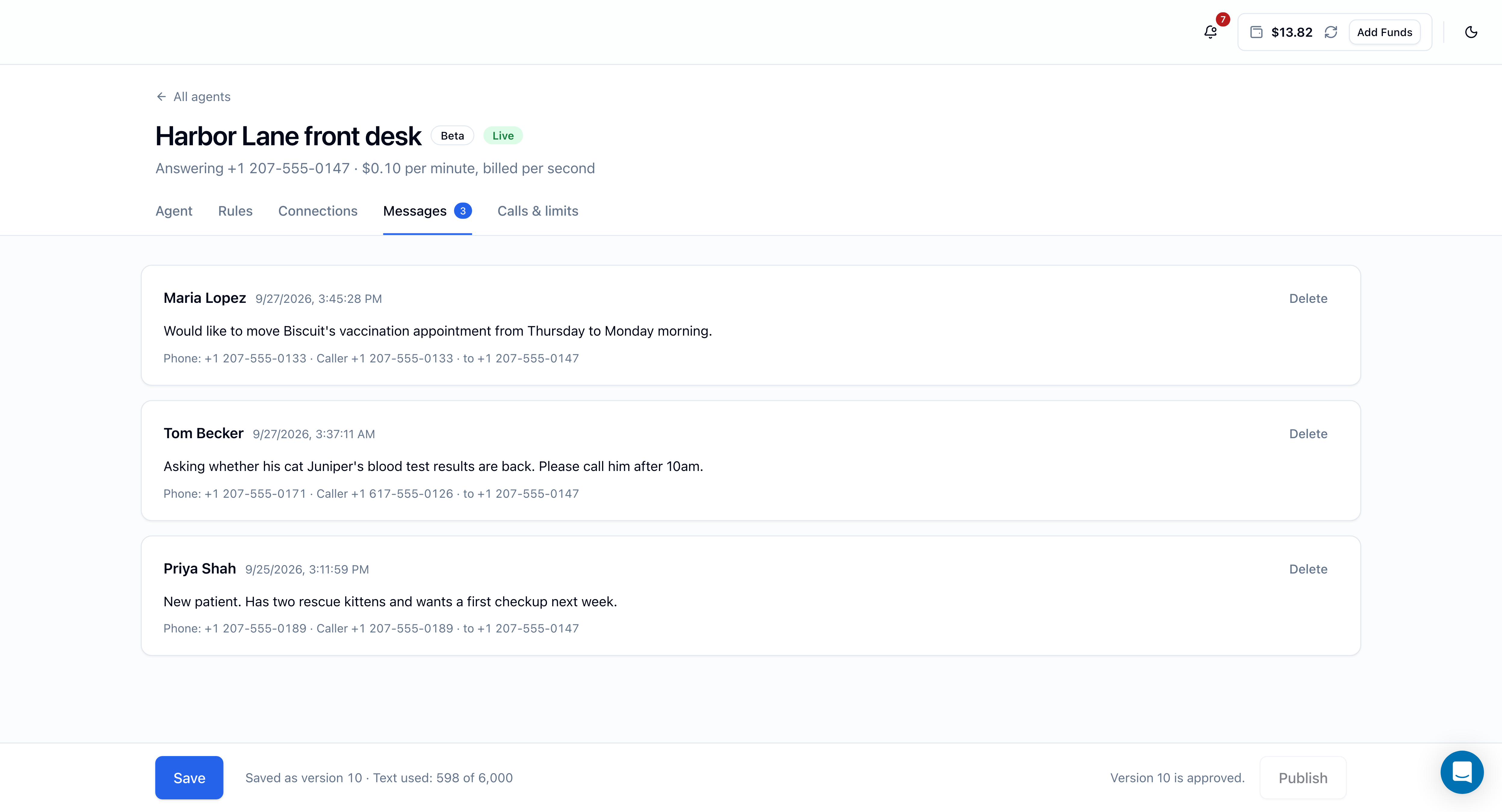
Each message shows:
- The caller's name as they gave it (or Unknown caller) and when they called.
- The reason for the call, as the agent noted it.
- The phone number the caller gave, the caller ID they called from, and which of your numbers they called.
The number the caller gives and their caller ID can differ; for example, someone calling from an office line may ask you to ring their mobile.
Delete a message
Click Delete on a message, then Delete again to confirm. It disappears from the Messages tab only; the call stays in the agent's call history, message included.
Notifications
Each new message also sends you a notification, shortly after the call ends:
- Title: New message for '[agent name]'
- Text: who it's from, the number they left, the reason, their caller ID, and the FlyNumber they called.
Clicking the notification in the panel opens the agent's Messages tab.
You also get a notification when a published version goes live.
Both arrive by email and in the panel's notification bell. To change that, open Notification Settings and use the Email and Panel toggles for the AI voice agents category.
Call history
The Calls & limits tab lists the agent's Recent calls, 25 at a time, newest first. Use Older calls and Newer calls to page through.
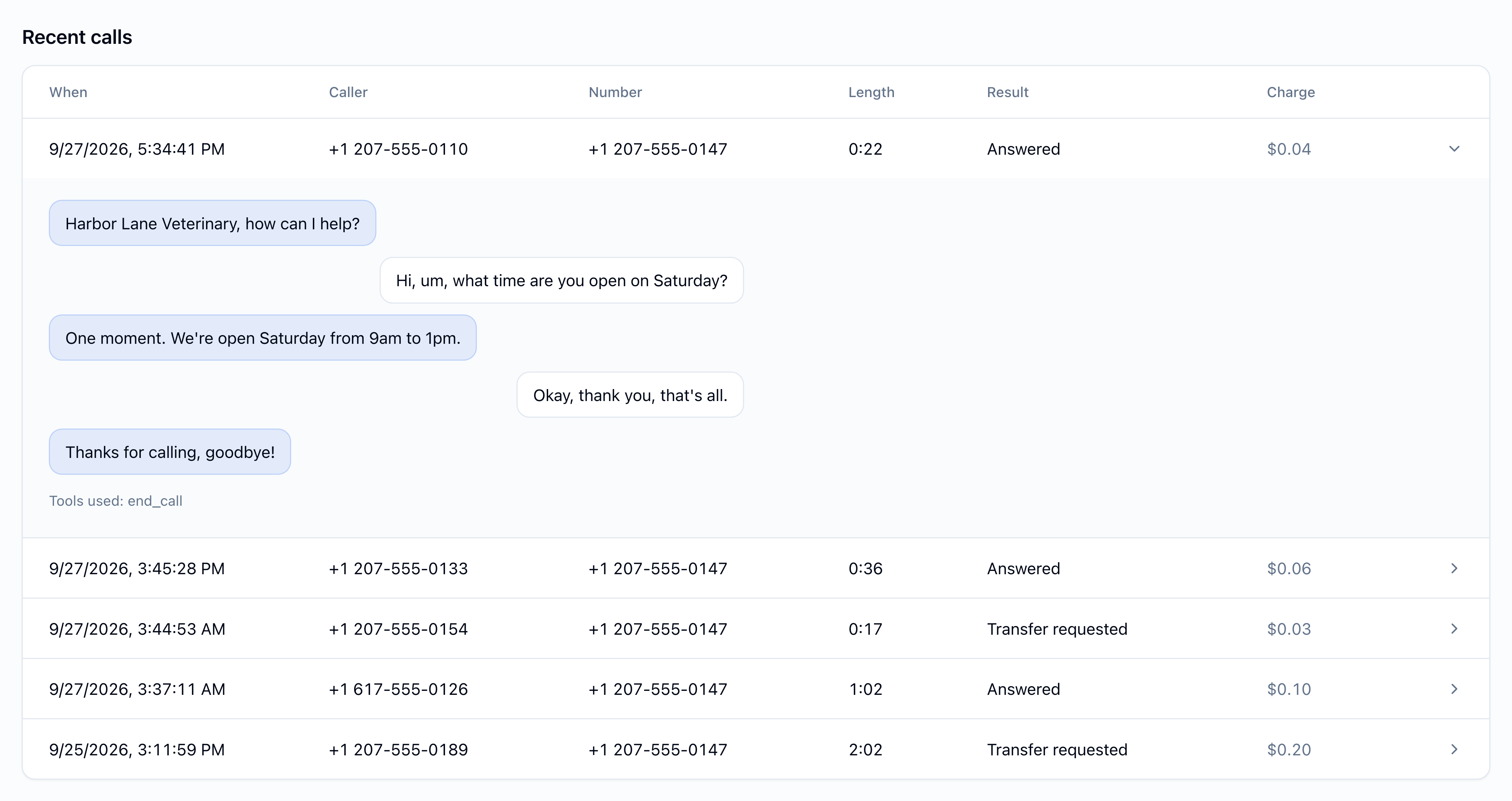
| Column | Shows |
|---|---|
| When | Date and time of the call |
| Caller | The caller's number, or Hidden if they hid it |
| Number | Which of your FlyNumbers they called |
| Length | Length of the AI conversation (minutes:seconds) |
| Result | What happened (see below) |
| Charge | The AI charge for the call (see below) |
Result
| Result | Meaning |
|---|---|
| Answered | The agent answered and the call ended without a transfer |
| Transfer requested | The agent transferred the caller to one of your transfer targets. This confirms the handover, not that someone picked up at the target |
| Not answered | The call reached the agent but ended before the agent answered |
| Blocked | The agent didn't take the call and the caller went to your fallback. The reason appears when you open the call (see below) |
The reasons for Blocked are:
| Reason | Why |
|---|---|
| Monthly ceiling reached | Your AI spending hit the monthly ceiling |
| Too many calls at once | Your account already had 2 AI calls in progress |
| Balance too low | Your available balance couldn't cover the call |
| Hidden caller ID | The caller hid their number and Answer callers who hide their number is off |
| This number wasn't connected to the agent | The number wasn't set to this agent when the call arrived |
| Temporarily unavailable | Any other reason the agent couldn't take the call |
Charge
| Charge | Meaning |
|---|---|
| An amount, e.g. $0.23 | The final charge for the AI conversation. (estimated) after the amount means the exact usage wasn't available, so the charge was calculated from the best available record of the call |
| Pending | The call is in progress or its charge is still being settled |
| Under review | The charge is being checked by our team |
| No charge | Nothing was charged for AI conversation (for example, a blocked call) |
This column covers AI conversation time only. Your number's usual charges, such as per-minute charges on metered inbound numbers and transfers to phone numbers, are billed as usual. See Pricing.
Call details
Click a call to expand it. Depending on the call, you'll see:
- The message, if one was taken: Message from the caller's name, the number they gave, and the reason.
- The transcript: the conversation as text, with the agent's lines on one side and the caller's on the other.
- Tools used: the actions the agent took during the call, such as
take_message,transfer_callorend_call. - For a blocked call, the reason it was blocked.
Calls aren't recorded as audio. The transcript is the written record of what was said.
How long call details are kept
Call transcripts, taken messages and caller numbers are deleted 90 days after the call. The call itself stays in the list with its date, length, result and charge; its Caller column shows — and opening it shows Details for this call are no longer available. A taken message also disappears from the Messages tab, along with its notification in the panel. Emails you've already received aren't affected.