AI Voice Agents
An AI voice agent answers calls to your FlyNumber for you. You tell it who it's answering for and what it should know, give it a few rules (take a message, transfer the caller, end the call), publish it, and then connect it to one or more of your numbers.
It isn't only for businesses. An agent can answer a shop's main line, a team's support number, or your personal number while you're busy.
AI voice agents are in beta. AI Voice Agents in the sidebar and the agent pages carry a Beta label. The recorded greeting comes in 16 languages, and the agent speaks the language you write its opening line and rules in, switching to the caller's language if they speak another one. There's one voice, Marin. See Greeting language.
How a call goes
- Someone calls a FlyNumber that's connected to your agent.
- A short recorded greeting plays first, in the greeting language you pick (in English: "Hi, you've reached an AI assistant."). It plays on every call so callers always know they're talking to an AI. You choose its language, but its wording can't be changed and it can't be turned off.
- The agent says your opening line ("How can I help you today?" on a new agent). If you leave the opening line empty, the agent waits for the caller to speak.
- The agent answers questions from the information you gave it and acts on whichever of your rules matches: take a message, transfer the caller, or end the call.
- The AI conversation lasts up to 5 minutes. At that point the call ends.
If the agent can't take a call at all (for example, you've reached your monthly ceiling), the caller goes to your fallback instead. See When calls go to your fallback.
While you edit an agent, a How a call goes panel beside the form shows these same steps filled in with your settings, and updates as you type.
What an agent does and doesn't do
| An agent can | An agent doesn't |
|---|---|
| Answer questions from the facts you write in What should the agent know? | Record calls. You get a written transcript of each call instead |
| Take a message: the caller's name, phone number and reason, sent to you by email and panel notification | Use a voice other than the one offered |
| Transfer the caller to a phone number, a FlyNumber SIP account, or a SIP address already set up on your account | Send or reply to SMS |
| Say a short goodbye and end the call when the caller is done | Book appointments, check a calendar, or look things up on the web |
| Answer callers who hide their number, or send them to your fallback (your choice) | Play your own recorded greeting audio |
The agent is instructed to answer only from the facts you give it and never to invent any. If a caller asks something that isn't covered, a Take a message rule gives them a way to reach you.
There's no separate test mode. An agent handles real calls once it's live and connected to a number, so the simplest way to try one is to connect it to a FlyNumber and call that number yourself. Each test call is billed like any other AI call.
Set up an agent: the short version
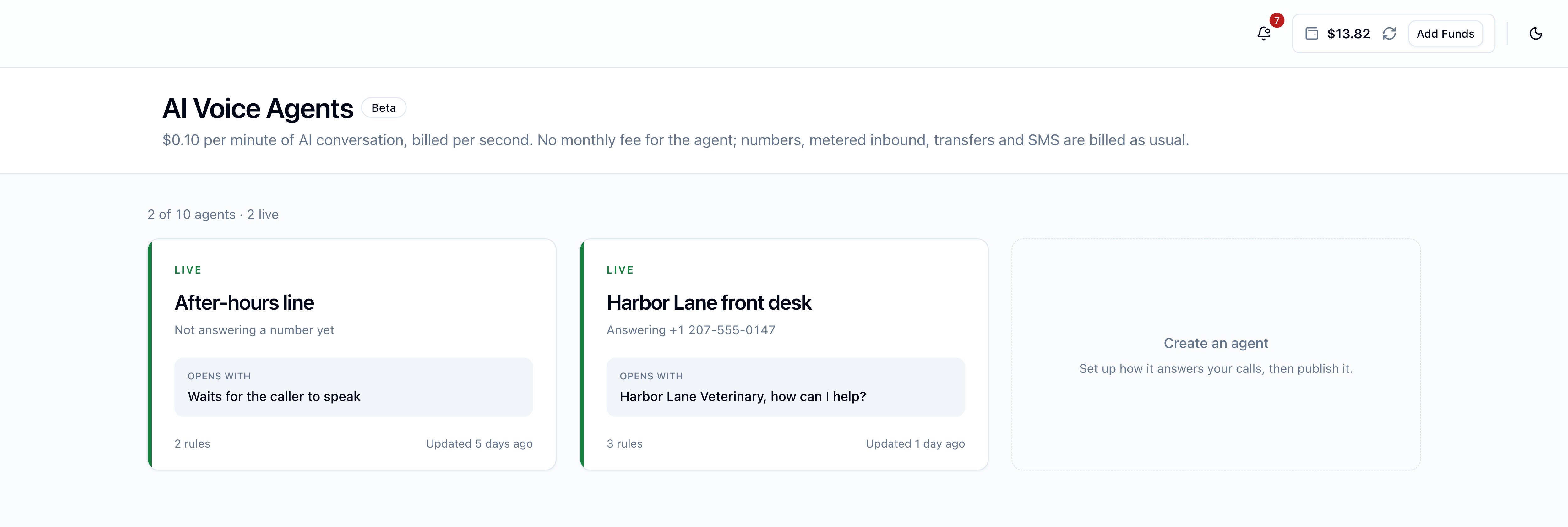
- Open AI Voice Agents in the panel sidebar and click the Create an agent tile. Give the agent a name. (Details)
- On the Agent tab, say who the agent answers calls for and how it should behave.
- On the Rules tab, set the opening line and the rules. (Details)
- On the Connections tab, write what the agent should know and add any transfer targets. (Details)
- Click Save, then Publish. Publishing needs a balance of at least $10. (Details)
- Once the agent is live, open a number in My FlyNumbers, choose AI voice agent answers in its Call Handling card, pick the agent, and click Save Settings. (Details)
Pricing
$0.10 per minute of AI conversation, billed per second. No monthly fee for the agent; numbers, metered inbound, transfers and SMS are billed as usual.
A monthly ceiling (default $50) caps what your agents can spend on AI conversation each month. See Pricing, limits and settings.
Built-in agent or your own AI platform?
If you already use an AI voice platform such as VAPI or ElevenLabs, you can keep connecting it to your FlyNumber over SIP. That setup is covered in AI voice platforms.
| Built-in AI voice agent | Your own AI platform over SIP | |
|---|---|---|
| Where you set it up | AI Voice Agents in the FlyNumber panel | The platform's own dashboard, plus a SIP address on your FlyNumber |
| Separate account needed | No | Yes, with the platform |
| What you pay FlyNumber | $0.10 per minute of AI conversation, plus your number's usual charges | Your number's usual charges |
| Languages and voices | Greeting in 16 languages, one voice; the agent follows your text and the caller | Whatever the platform offers |