Rules and Opening Line
The Rules tab controls what the agent says first and what it does during the call. It has two parts: the opening line, and the list of rules.
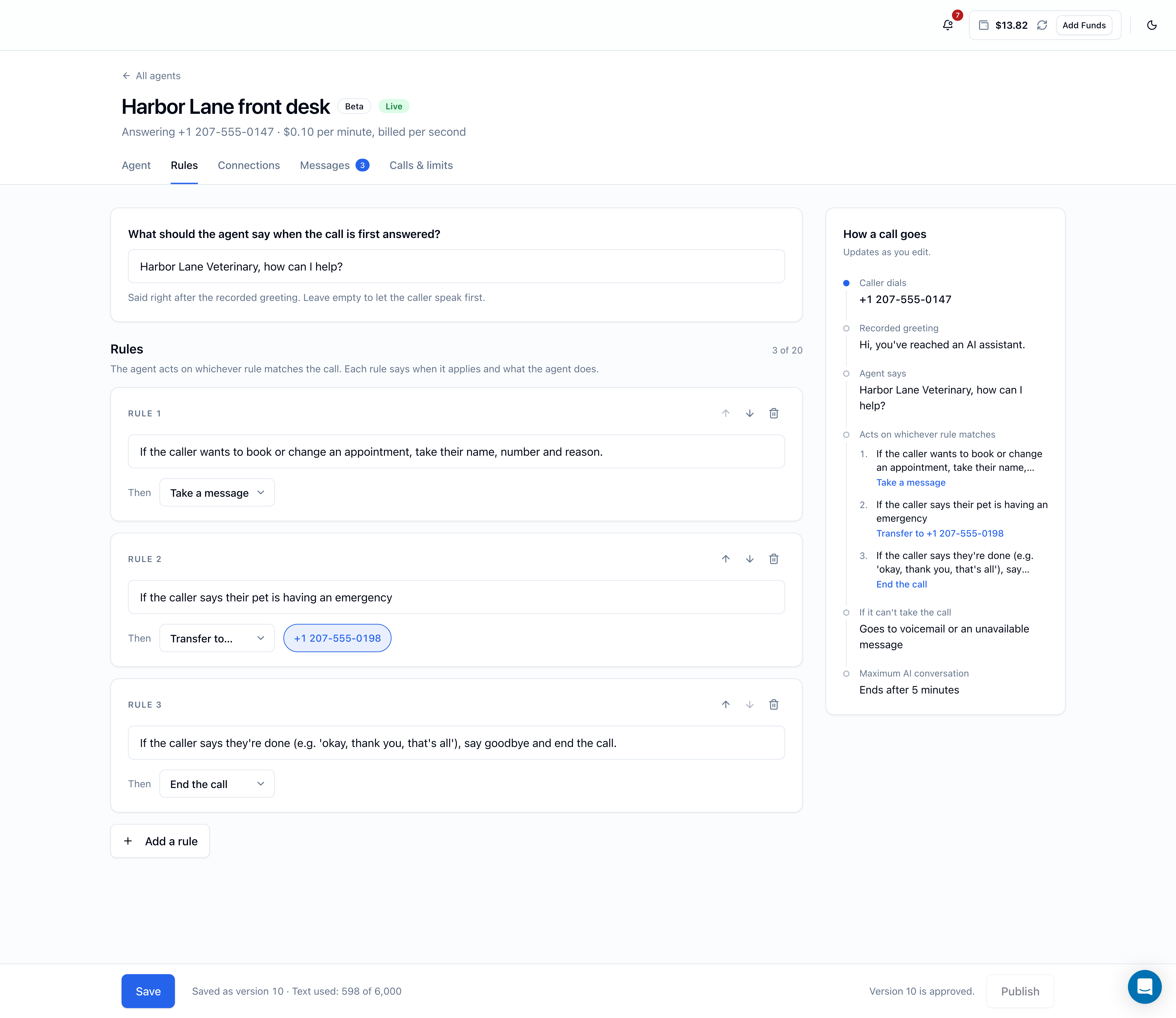
What callers hear first
Every call starts the same way:
- The recorded greeting, in the greeting language set on the Agent tab (in English: "Hi, you've reached an AI assistant."). It plays on every call, for every agent, so callers know they're speaking with an AI. You can't change its wording or remove it.
- Your opening line, if you've set one, spoken by the agent right after the greeting.
Opening line
The field is labeled What should the agent say when the call is first answered?
- Up to 120 characters.
- New agents start with How can I help you today? If your agent speaks another language, translate it; the agent starts the call in the language of this line.
- Leave it empty and the agent says nothing after the greeting; it waits for the caller to speak first.
The recorded greeting already tells callers they've reached an AI assistant, so the opening line doesn't need to. Use it to say whose line this is, or to point callers toward what the agent can help with:
- Thanks for calling Harbor Lane Veterinary. What can I do for you?
- You've reached Dana's line. Would you like to leave a message?
The opening line also appears on the agent's card on the AI Voice Agents page, under Opens with.
Rules
A rule has two parts:
- When…: a short description of the situation, in plain words (up to 200 characters).
- Then: the action the agent takes when that situation comes up.
Each rule appears as a card (Rule 1, Rule 2, …). Click Add a rule to add one. An agent can have up to 20 rules; the count (for example 3 of 20) sits above the list.
Rules aren't steps that run in order. The agent acts on whichever rule matches what the caller is saying. You can reorder the cards with the arrow buttons and remove one with the bin icon, but the agent doesn't work through them top to bottom.
Actions
The Then menu has four actions:
| Action | What the agent does |
|---|---|
| Just answer | Talks with the caller; no other action. Use it to guide how the agent replies in a situation, such as how to handle a question it should deflect |
| Take a message | Asks for whatever it doesn't have yet among the caller's name, phone number and reason, then saves the message. It appears on the agent's Messages tab and you get a notification |
| Transfer to… | Transfers the caller to the target you pick. Choosing this action shows a row of buttons, one for each transfer target turned on for this agent; click the one you want |
| End the call | Says a short goodbye and hangs up |
The agent can only take messages, transfer callers, or hang up through rules with those actions:
- With no Take a message rule, the agent can't take messages.
- With no Transfer to… rule, it can't transfer callers.
- With no End the call rule, it doesn't hang up on its own; the call ends when the caller hangs up or when the 5-minute limit is reached.
When a caller asks to speak to a person and a transfer rule matches, the transfer comes first: the agent transfers right away, even if it was in the middle of taking a message.
A transfer rule needs a target
A Transfer to… rule can only use a target that's turned on for this agent in the Connections tab. If none are turned on, the rule shows Turn on a transfer target in Connections first. If you save a transfer rule without a target, Save stops with Pick a transfer target enabled for this agent.
In the How a call goes panel, each rule is listed with its action. A transfer rule that's missing its target shows Transfer — choose a target in red.
The rules a new agent starts with
| When… | Then |
|---|---|
| If the caller wants to leave a message, take their name, number and reason. | Take a message |
| If the caller says they're done (e.g. 'okay, thank you, that's all'), say goodbye and end the call. | End the call |
Keep them unless you have a reason not to. Removing the second rule means the agent won't hang up when the caller is finished. If your agent speaks a language other than English, translate their When… text.
Writing good rules
Describe the situation the way a caller would bring it up, and keep one situation per rule. Some examples:
| When… | Then |
|---|---|
| The caller says their pet has swallowed something or is having trouble breathing | Transfer to… (the on-call vet's mobile) |
| The caller asks for a quote. Explain that quotes are given after a site visit and offer to take a message | Just answer |
| The caller wants to change or cancel an appointment | Take a message |
| The caller is selling something or conducting a survey | End the call |
| The caller says it's family or it's urgent | Transfer to… (your own mobile) |
Facts the agent needs (opening hours, prices, where to park) belong in What should the agent know?, not in rules.