Modules Overview
Modules are the essential components that power your phone system. Think of them as building blocks that you can connect together to create your perfect call flow. Each module handles a specific task - from receiving calls to playing messages or routing callers to the right department.
Quick Setup
When you drag a module onto your workspace, a setup window opens automatically on the right side of the screen. Fill in the required settings and click Save to activate your module. Not ready to set it up? Click Cancel and the module will be removed, keeping your workspace clean and organized.
Managing your modules is straightforward:
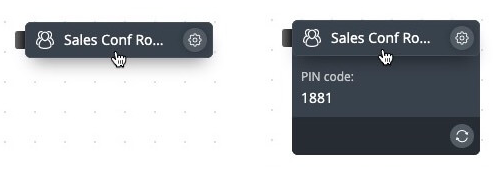
- Click once to expand and see what's inside
- Look for the gear icon (⚙️) when you need to change settings
- Modules connect together to build your call flow
Available Modules
The module menu on the right side of the workspace lists these modules:
| Module | What it does |
|---|---|
| Phone Number | Entry point for calls to one of your FlyNumbers |
| Internal Number | Entry point for calls to an extension dialed from inside the phone system |
| Ring Group | Ring one or more contact methods, together or in sequence |
| Voice Menu | Play a greeting and route by the key the caller presses |
| Audio Playback | Play an audio file, then pass the call on or end it |
| Conference | A shared room callers join, optionally protected by a PIN |
| Voicemail | Record a message and send it to a delivery method |
| Fax | Receive faxes and deliver them as PDF |
| Call Recorder | Record the rest of the call and deliver the recording |
| Caller Router | Route by the caller's number or prefix (Yes/No outputs) |
| Blocklist | End calls from listed numbers |
| Queue | Hold callers in line until a member is free |
| Time Router | Route by day and time using a time schedule (Yes/No outputs) |
| Notification | Send an email when a call reaches this point in the flow |
| Forwarding | Hand the call to a module in another Call Flow |