Time Router
The Time Router module directs calls to different destinations based on the time and day of the week. Perfect for managing business hours, holidays, and special schedules.
- Business hours routing
- After-hours handling
- Weekend schedules
- Holiday management
- Lunch break routing
- Special event scheduling

Notice the green and red sockets on the right side:
- Green (Yes): Routes calls during defined time intervals
- Red (No): Routes calls outside defined time intervals
Setting It Up
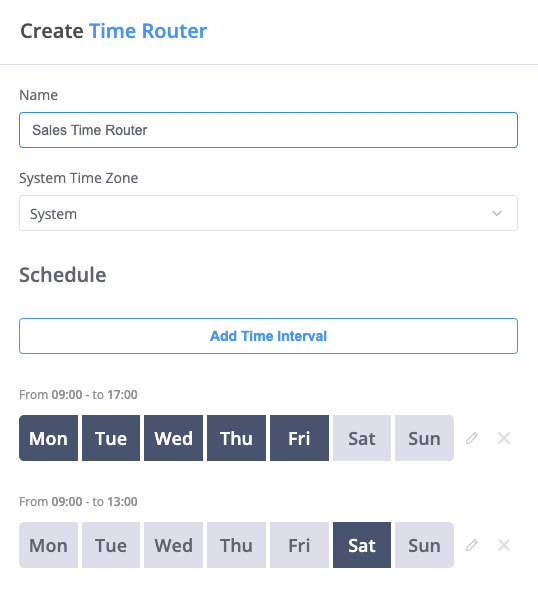
Configure your Time Router with these settings:
-
Name: Give your router a descriptive name (e.g., "Business Hours" or "Weekend Router")
-
Time Zone: Choose between:
- System (uses your phone system's time zone)
- Specific time zone for this router
-
Time Intervals: Create schedules by clicking "Add Time Interval"
- Select days of the week
- Set start and end times (24-hour format)
- Add multiple intervals for complex schedules
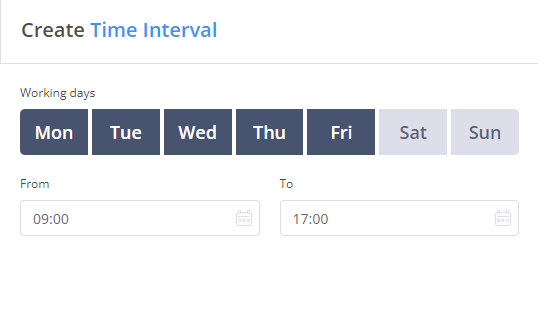
You can create several time intervals for flexible routing. For example:
- Monday-Friday: 8:00-17:00
- Saturday: 9:00-13:00
Practical Example
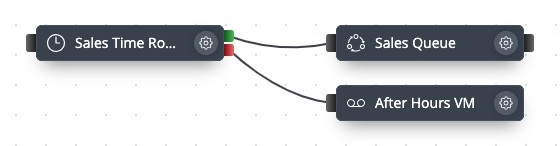
This example shows:
- During business hours (green path):
- Calls route to the Sales Queue
- Outside business hours (red path):
- Calls go to an after-hours voicemail
Time Management Options
The phone system offers two ways to manage time-based routing:
-
Time Router Module:
- Part of your call flow
- Specific to one routing scenario
- Flexible interval configuration
- Immediate routing control
-
Time Schedules (Main Menu):
- Organization-wide schedules
- Applies to multiple users
- Manages exceptions (holidays)
- Controls all contact methods for users
- Use Time Router for specific call flow routing
- Use Time Schedules for organization-wide time management
Best Practices
-
Time Zone Management:
- Consider caller locations
- Account for daylight saving
- Use system time zone for consistency
-
Schedule Planning:
- Include buffer times
- Plan for holidays
- Consider lunch breaks
- Account for early/late calls
-
Routing Strategy:
- Set appropriate after-hours handling
- Configure holiday routing
- Plan emergency bypasses
- Test across time boundaries
-
Multiple Intervals:
- Group similar time patterns
- Keep intervals organized
- Document special cases
- Review regularly
Calls without a matching path (no connection from the appropriate socket) will be terminated. Always ensure both Yes (green) and No (red) paths are properly configured.
Advanced Tips
| Feature | Description | Example Use |
|---|---|---|
| Multiple Intervals | Several time windows | Different weekend hours |
| Timezone Selection | Local or system time | International business |
| Yes/No Logic | Dual routing paths | Business/after hours |
Connect Time Router with other modules like:
- Ring Groups for team availability
- Voicemail for after-hours messages
- Queue for business hours handling
- Audio Playback for time-based messages